


Written Android App Review
If you’re a digital pack rat who clocks away every little scrap of something that floats your way, Evernote for Android, by the excellent note-storing service Evernote, has you covered—and then some. The app is one hundred percent free, and with a little effort, it could easily change the way you do things in the office, out at school, or even around the house.
Functionality
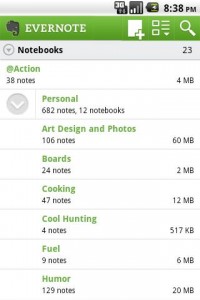
For those unfamiliar with the cloud-based note service that Evernote offers, the excellent (and free) platform allows you to file text, video, picture, and multimedia notes away into folders. Each folder you create, including its notes, are stashed onto Evernote’s servers where they can be perused using tags, text searches, or listing by date. And naturally, your notebooks stay together as units, making it incredibly easy to find what you’re looking for on any platform that Evernote supports.
Now that alone may not seem like much—at the least, Google Docs performs a similar function—but where Evernote truly shines is in its portability. Evernote for Android allows you to use your Android device to communicate with existing notebooks. You can, within just a few clicks, add a new note, upload a snapshot to your Evernote account, or modify existing notes. With such easy access to a cloud-based file server, you can easily snap a picture of an interesting flier, or take small class notes from your Android device. With an Android tablet, it would even be feasible to sample whole meetings or lectures, saving text and audio for use later.
Evernote
Design
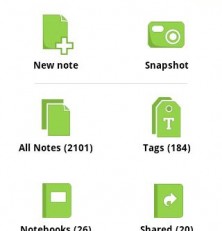
Evernote for Android is a very simple affair. When first booted, the app presents a clean login interface, and then a neat stack of icons after. The ubiquitous green interface that the web-version of Evernote ports is present here, which will make those familiar with the service feel right at home. From the home screen creating a new note is as simple as hitting an icon. Similarly, a single click produces a list of existing notes, notebooks, tags, and shared items. A snapshot emblem is even present, making it lightening quick to add a photo to your account—an ideal feature for an Android app, where presumably one will be on the go and in a hurry. Notes themselves can be arranged however you like, and are well-rendered. However, depending on your phone, text entry may be a bit awkward on the thumbs.
Overall Value
Evernote for Android is a free app that makes it ridiculously easy to streamline your daily processes. With excellent cloud-based offerings, as well as a professionally designed interface, you have no reason to leave Evernote off your phone. The next time you’re looking for a quick way to store a quick something-or-other, don’t hesitate: Go straight to the market for this free Android gem.
Android Apps Review Details: Evernote Android app is free. This app requires Android 1.5 and up. You may download Evernote from the Android Market.
This Android app review, as well as the other Android app reviews for droid phones and droid tablets on this site, are brought to you by AndroidAppsReview.com.
Evernote Android App Video Demo








