


Written Android App Review
Features:
For those who use Course Smart already for all your college textbook needs, you will be happy to know that all your favorite features are here – including note taking. For those who aren’t familiar yet, let me share the joys of this new app:
1) Complete portability: I have used Course Smart for two years now and while virtual textbooks are fantastic (and especially helpful during tests if you do online college like me) my biggest complaint has been portability. In order to study outside of my home, I would have to lug around a laptop. Sure I could technically view my books on my phone using the browser but this was not efficient and the text was difficult to read (since the web layout is dual pages). Shortly after I began using their services, they released an iPhone app but alas, I do not own (nor do I want to own) an iPhone. But now that they have officially released an Android version, I can now read and study from anywhere and do it comfortably and easily.
2) Table of Contents: The Contents button is fantastic. It’s amazing what joy can be derived from something as simple as a well-formatted table of contents. Upon ‘opening’ my book, I can immediately go to the chapter or section I want without scrolling through the whole book or any other unnecessary ‘clicks’.
Course Smart
3) Go To: Another simple but fantastic feature is the Go To tab. Here I can type in the exact page number I want to go to (assuming I know it of course) or skip to another part in the book with another well-formatted table of contents. But the coolest feature here is the proximity scanning with images. For instance, if I’m on page 293, it will show me a small screenshot of pages 293, 294 and 295. What’s even better, is that I can drag these pictures side to side and see a visual representation of each page. So if I’m looking for a particular chart or graphic but don’t know the page number, I can visually scan without waiting for full page loads. Pure. Genius.
4) Notes: One of the things I love about Course Smart is the ability to take notes right in the textbook. Thankfully this feature was included in the Android app. While I can’t select text and create a note from it like I can on the website, I can still add notes by clicking the Notes tab, then the menu button, and ‘Add Note’. There I can give it a ‘Tag’, such as “Data Types” then type in a note to help remember what I need to know. Once I have done this, I can view the Notes tab again and see all the notes I have entered for this book.
5) Search: One of my favorite features though is the Search option. Simply go to the Search tab, type in the keyword(s) and voila – results from throughout the book populate to help you find what you need. Just select the entry which closest matches what you’re looking for and the app will take you directly to that page. Can’t remember the definition of a term? The search feature has you covered.
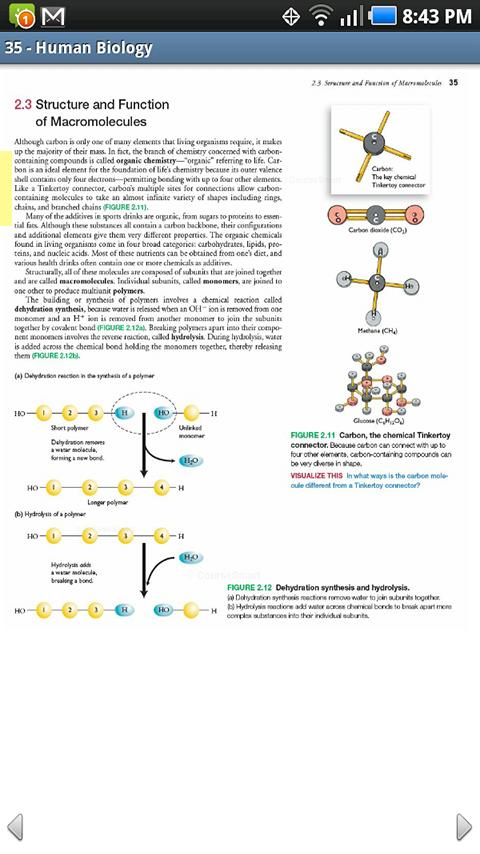
6) Ruler: Last, but not least, I want to mention the new Ruler feature. Unfortunately, no matter how great the app is, the fact remains that reading a textbook on a phone is going to create scrolling. The inherent problem with this is that the reader often loses their place in the process. Well fear no more! Ruler is here! Simply touch the menu key and then “Show Ruler” (or “Hide Ruler” if you don’t want/need it). A light yellow highlight will appear, spanning across the screen and is movable vertically. Now I can zoom in to my heart’s content without fear of losing my place during scrolling. Sigh. I am one happy college student.
Design:
Course Smart’s app is not only useful, it looks good too! It’s simplistic, clean cut layout and tabbed interface, combined with the menu system, make using this application a breeze. Everything is laid out in black and white (well okay, gray and white – close enough). I couldn’t ask for a better interface on this type of application.
Value:
If you are a college student but don’t currently use eTextbooks, START!!! Seriously, I saved $100 off just ONE textbook this term. And now that you have complete portability, what are you waiting for? This app is free, so once you have the needed books, you won’t have to worry about paying any extra fees. Better yet, you won’t have to break your back carrying heavy textbooks around with you. Have 10 minutes during lunch? Spend it studying with this app. Seriously, studying has never been this good.
Android Apps Review Details: Course Smart Android app is free. This app requires Android 1.5 and up. You may download Course Smart from the Android Market.
This Android app review, as well as the other Android app reviews for droid phones and droid tablets on this site, are brought to you by AndroidAppsReview.com.









