


Written Android App Review
Ever wondered if there might be something wrong with your health but didn’t want to go pay a Doctor to find out? Not near your PC but wonder why you can’t stop scratching? Well, hypochondriacs of the world have no fear – WebMD Android App is here!
Functionality
One of the biggest features is WebMD’s Symptom Checker, which is what made WebMD what it is today. The user can boot the Android app and either double tap a physical representation of a male or female (depending on your gender of course) or manually select the ailing area and enter the symptoms he or she is experiencing. From there, WebMD will suggest possible conditions based on the input and provide information on overall symptoms, definitions of the ailments and related articles. While this sounds great, there are inherent flaws with the program.
WebMD
1) As with medicine in general, so many symptoms mimic so many illnesses and conditions that it can be difficult to really pinpoint a problem. This app proves this is true by the number of results it returns after entering your symptoms. So ultimately, you’re no better off than when you started. Tell it you’re bloated and it will return that it could be gas, irritable bowel syndrome, gastroenteritis, gallstones, giardiasis, ovarian cancer or PMS, among others. With that said, it does have a fairly intuitive symptom checker which asks qualifying questions to get to the source. Also, inputting multiple symptoms will return slightly more accurate results. The key here is quantity in order to narrow down results. However, there are still too many possible answers. Going to a Dr. is still the best solution if there are any doubts about your health.
2) I’m sure they had the best intentions, but the articles that populate after a search are often either misleading or completely off. For instance, after selecting the female genitalia and listing a symptom of “itch” (just for kicks of course), many results populated, amongst one of which was the STD, Crabs. The Overview and symptoms may have been accurate, but the article list it pulled was hysterical. It listed crab meat recipes! It also had an article about shell fish allergies. So apparently if a girl gets crabs, she can then kill them (to get rid of them of course) then cook them for dinner, and then find solutions to curing a shell fish allergy all from WebMD. Sick. Clearly their article intuition needs a little more development. But it was good for a chuckle at least!
Outside of these amusing flaws, the application has some fairly nice features, such as:
- Pill Identification Tool: Simply by typing in the letters or numbers on a pill, the user can identify it and avoid any potential mishaps by taking the wrong one or one which could cause an interaction with another medicine. Pills can also be matched by shape and color as well.
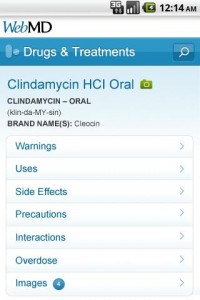
- Drugs and Treatments: This is a comprehensive database of drugs, supplements and vitamins and includes information on side effects, warnings and proper usage.
- First Aid Essentials: As the name suggests, this tool provides the user with emergency first aid which can be essential to saving a life in some cases. This handy feature doesn’t rely on an internet connection, so it is truly handy in even the most dire emergency situations (if you can keep your cool long enough to use this tool anyway).
- Local Health Listings: This tool didn’t work for me (except for the hospital), but I live in an area where this is typical of these types of applications. Ideally, this tool will help the user find the nearest physician, hospital or pharmacy. It can use GPS to pinpoint your current location or you can search by city, state or zip. From here the user can get a map with directions, save the information as a contact in the phone and more.
- Sharing: Some information, such as first aid, medications and conditions can be emailed to either yourself or to a friend.
Design:
WebMD
WebMD did a fantastic job with designing this application. The design is very clean and utilizes just three primary colors: light blue, white and orange. Buttons and links are easy to select, the transitions are smooth and menus load quickly. They have certainly designed this app to be user friendly.
Value:
Like their website, the WebMD Android application is totally free. It doesn’t get much better than that for value. And considering the loads of information and services this app offers, free is great. Other apps may charge for this level of information but thankfully, WebMD does not.
Overall, it seems WebMD has a nice application, but it could still use some fine tuning to make it flawless. Regardless, this is one app I will likely be keeping around.
Android Apps Review Details: WebMD Android app is free. This app requires Android 2.1 and up. You may download WebMD from the Android Market.
This Android app review, as well as the other Android app reviews for droid phones and droid tablets on this site, are brought to you by AndroidAppsReview.com.











Nice blog keep up good work.