


Written Android App Review
Google Books is an amazing resource, with all sorts of wonderful applications. However, I have been frustrated by the difficult in accessing it and comparing books through it, especially on mobile devices. FriendItem, from a South Korean app developer, is a wonderful Android app that combines a virtual book library with social media functions and a very useful Google Books feature.
The FriendItem Android App basically lets users create a library list of the books they own, want, borrow, etc, and customize the info on each books (through notes, ratings, and so forth). At the same time, users can share their book info with others through social media networks like Facebook, and also access online Google Books services to preview their books (when applicable).
Options Galore!
Functions
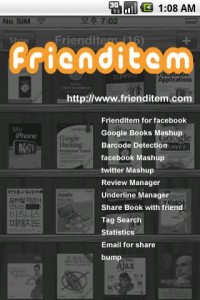
To add a book, users can simply and easily scan the book’s bar code with their Android device’s camera. FriendItem then instantly looks up the item and shows the user the book detected. Alternatively, users can search for their books via keywords or ISBN number.
From here, users an edit the book info, share about the book on Facebook, Twitter and via email, add notes (both reviews and underlines), and even add start-stop reading dates (a great way to encourage yourself to get through the entire book). Users can also view the books listed info (Publisher, ISBN, pages, etc) and select to purchase the book through a Korean book website, straight from the FriendItem app! Hopefully, the developers will add support for ebook websites, especially in English, in the future.
Furthermore, when the option is available, FriendItem also shows the item in GoogleBooks. This is an insanely useful feature that I really like and makes FriendItem quite different from other ‘book’ services. The browser isn’t perfect, but it certainly helps users quickly skim and preview books before purchasing them. The camera barcode scan does require a network connection and I was happy to see how quickly the camera could pickup items and find them online.
Graphical Layout and Sounds
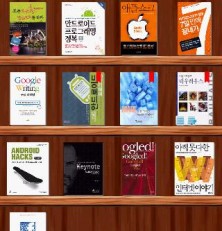
If you’ve used apps like iBook, then you will feel right at home with FriendItem. This app has a virtual bookshelf where users can view their “library.” From here, the info on each book can be viewed, books may be added or deleted, and even purchased online, if they are available. Sounds are limited to camera notifications, helping you know when the barcode has been picked up successfully. Some of the tabs on FriendItem feel a little dated, and the app has a slightly rough feeling around the edges, but overall the layout is great and easy to use!
Value
For a free app, FriendItem sure packs in a lot of features! I’m not sure how many people will actually keep track of their book reading progress via FriendItem, but I think the overall organization scheme is very handy. This is especially a great app if you are an avid reader, or a student with loads of different textbooks to keep track of. Also, the Google Books look up feature is super nice and definitely another good reason to try out FriendItem!
Android Apps Review Details: FriendItem Android app is free. This app requires Android 1.6 and up. You may download FriendItem from the Android Market.
This Android app review, as well as the other Android app reviews for droid phones and droid tablets on this site, are brought to you by AndroidAppsReview.com.











