Written Android App Review
Have you ever found a fantastic Android app and wanted to share it with all you friends? Or, did you want to share a list of your favorite apps? If so, then you probably ran into just how annoying it is to send such a list. There isn’t an easily accessed, built-in-feature on Android for this. However, one awesome free app, ShareMyApps, seeks to change this. ShareMyApps allows you to quickly browse the apps you own, select which ones you want to share, and then auto creates a list that can be emailed, texted or copied to the clipboard of your Android device.
Functions
Don’t be fooled, ShareMyApps is not a program to send the actual Android app files to other Android users. Instead, ShareMyApps allows you to send, via email or text message, a list of the apps with included hyperlinks to the Android Marketplace that you wish to share. This way, your friends can easily find the apps in the Android Marketplace and try them out for themselves. Also, ShareMyApps allows you to quickly “copy” a list of the apps you have, with hyperlinks, to your clipboard. This way you can easily paste it on Twitter, Facebook or other places to share your apps through the Internet. ShareMyApps presents the user with a list of the apps they currently have, with checkboxes, allowing you to quickly select which apps you want to share with your friends.
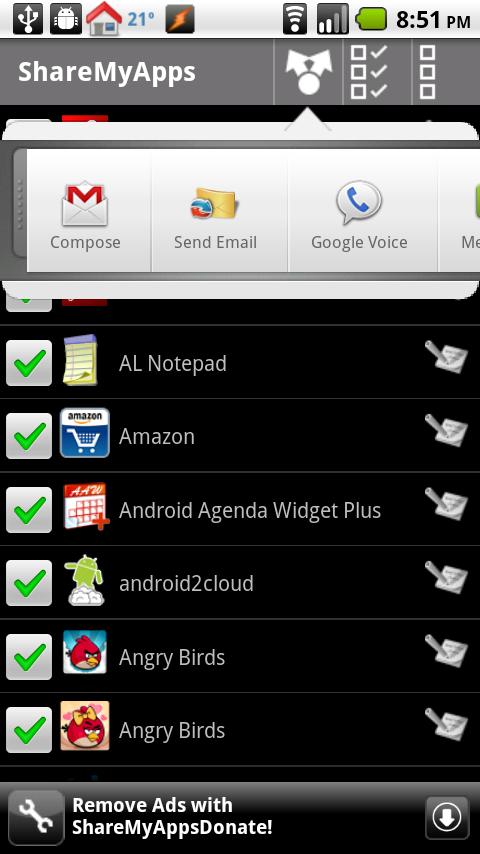
ShareMyApps
It would be nice if Facebook, Twitter, Blogger and other popular social media functions were integrated into ShareMyApps, but perhaps future updates will see these options added as well.
Graphical Layout
ShareMyApps has a really easy to access and simple layout. Once you boot it up, you’ll see a list of your installed apps, along with their app icons for easy recognition. There’s a little checkbox next to each app, and a top tab bar, with several options (send/upload, check all or uncheck all). ShareMyApps also nicely shows you which apps are new additions to your collection and which aren’t. I would say ShareMyApps is the fanciest of graphical app layout examples, but its neat and concise, perfect for maximum productivity.
Value
Everyone has apps that they really love and it can be kind of an annoyance to share them with friends. However, ShareMyApps takes some of the pain of this away by letting you easily send, via email, text or just copy/paste a list of the apps you want to share. It’s a great way to quickly let your friends in on some great apps, without the pain of having to type in the name or search for a specific app through the app market. Even better, ShareMyApps is free! I definitely recommend grabbing ShareMyApps today and making good use of its user-friendly features!
Android Apps Review Details: ShareMyApps Android app is free. This app requires Android 1.5 and up. You may download ShareMyApps from the Android Market.
This Android app review, as well as the other Android app reviews for droid phones and droid tablets on this site, are brought to you by AndroidAppsReview.com.