


Written Android App Review
GameFly is best known for providing hot video game titles for rental to their users through its ultra-convenient mail service. And GameFly for Android is experiencing a rebirth. A new name, new Android app, and new look are just part of the appeal. Android app users with a sweet tooth for gaming will find this app leaves very little to be desired.
GameFly
Features
In performing the Android apps review I was quite pleased. In fact you can browse games to your hearts content, keep up to date on gaming news and manage your “GameQ” with GameFly for Android. Those are all fairly standard features, but GameFly makes them customizable and tailored to your platform and preferences. Organize game searches by new release, platform and popularity. Even get a sneak peak at what’s coming out next.
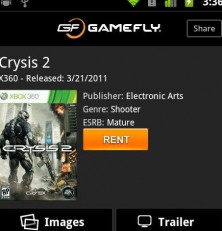
Click on a game to view trailers, game images and reviews from users and critics. This attention to detail makes the process just as easy on your mobile phone as it would be on GameFly’s website. Personally, I like the app layout a little better. It has less fuss and more direct access to what I want to know about a game before I rent it.
Stay on the cutting edge with a personalized “News” tab. A simple tap of the upper right-hand corner allows you to view results by platform, whether you game on your PC, Wii, Xbox 360, PlayStation (2 or 3), PSP, or Nintendo DS. Or read it all. News links lead to stories, updates, deals and more.
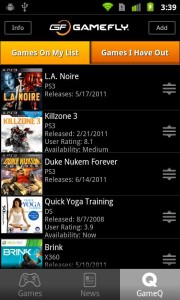
Enter your personal “GameQ” to see what games are heading your way soon or change your preferences. New users will find a link to a 15 day free trial in this tab. Click this link and complete registration on GameFly’s mobile site. There is also an extremely thorough “Info” link in the upper left-hand corner of the “GameQ” tab. GameFly populated this button with a dozen different screens answering common questions about their services.
GameFly
User Interface
GameFly the app kicks GameFly the mobile site in the pants. Content is easy to find, easily organized and usefully customizable. Navigate between the three main tabs with a simple touch of the correct heading. If you’d prefer, edit news and game browsing filters by pressing your Android menu button and selecting “Settings,” where you can also enable sharing with Facebook and Twitter or invite friends to GameFly. Game graphics, screenshots and news images add visual interest to the app.
Value
Give GameFly’s free Android app a try if you are considering signing up for GameFly’s video games by mail service. It’s a great way to easily find out what games are available and decide if the service is for you. The app is missing a few GameFly website features, such as the trade in tool. Even with a few missing features, the game info (including cheats and tips), the queue and the up-to-the-minute news feed make this app worth it.
Android Apps Review Details: GameFly Android app is free. This app requires Android 1.6 and up. You may download GameFly Android apps from the Android Market.
This Android app review, as well as the other Android app reviews for droid phones and droid tablets on this site, are brought to you by AndroidAppsReview.com.











Excellent pieces. Keep posting such kind of information on your site.
Im really impressed by your site.
Hi there, You have done an incredible job. I will definitely digg it and in my opinion recommend to my friends.
I am confident they’ll be benefited from this web site.