


Written Android App Review
Music services have been taking well aimed, yet mostly ineffective, shots at iTunes for years. It’s no surprise Google, creator of my favorite OS and yours, Android, got in line. Rumors about Google’s cloud-based music service have been circulating for about a year. Music is still in beta release, and the wait time for an invite is killer. Want to know what you’re missing? Read on.
Features
So what exactly does Google Music do? Once you submit a beta request (visit music.google.com) and receive your invite, install the music manager application on your computer. It will troll your existing music files and

Google Music
upload copies of them to Google’s server for safe keeping. Install Google Music on your favorite Android device, be it tablet or phone, and access your music wherever you please. The app will also auto load any music stored on that device and add it to your goodie vault.
I can hear the questions forming already. But what if I want to buy new music? What if my device is offline? But I stopped believing in Santa years ago! Take a deep breath. It will all be OK. Google Music has your back.
Google will be pairing with the music industry to ensure any music sales are on the up-and-up. The semantics of this agreement have kept Google Music off the shelf for months. Even the basic Google Music app for your Android without a beta invite allows you to shop for music through your browser.
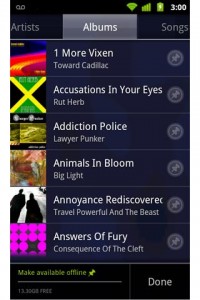
If you go offline several recently played tracks will be stored to your device’s cached memory. If this option seems a bit limited, simply access your menu while viewing available songs and tap “Make available offline.” Select push pins next to the songs you would like to enjoy while your phone is off the radar. This option is limited only by available phone storage.
Google slays iTunes’ “Genius” feature with “Instant Mix.” Simply tap the arrow next to a track you feel fits your current musical mood, select “Make instant mix” and Google will create a custom playlist just for you. The app also allows you to create new playlists on the go or on your computer that are shared across the board.
Google Music
Layout
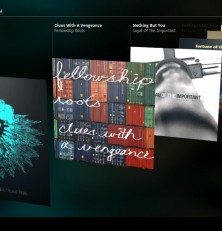
Handy top tabs give you access to your music organized by artist, album, song, playlist or genre. Google Music does reach out for track information and thumbnails to populate your list accordingly. Tap and hold a track for additional options, or use the menu button on your phone. The menu button does offer different options depending on the screen. Turn your Android device sideways for a completely different user interface.
Value
At launch, Google Music Beta is available free of charge. There are also 20,000 preloaded songs available to users. No word yet on any future pricing or changes, but you can check back in with Android Apps Review for information about future releases as we get them. Google Music is easy to use, incredibly efficient, and feature-rich without being unwieldy. Is Google Music to Android what sliced bread is to sandwich lovers? Maybe. Am I in love? Definitely.
Android Apps Review Details: Google Music Android app is free. This app requires Android 2.2 and up. You may download Google Music from the Android Market.
This Android app review, as well as the other Android app reviews for droid phones and droid tablets on this site, are brought to you by AndroidAppsReview.com.




I was very encouraged to find this site. I wanted to thank you for this special read. I definitely savored every little bit of it and I have you bookmarked to check out new stuff you post.