


Written Android App Review
Are you a fitness enthusiast who is looking for more feedback about your performance? Do you need help with a training schedule? Perhaps you’re a couch potato who wants to work out but isn’t sure where to start. Whatever your level of fitness is, miCoach Android app by Adidas has you covered. Simply turn the Android app on when you go walking, running, biking, or a number of other activities and miCoach does the rest.
Features
When I performed the Android app review one word came to mind - features. The amount of features for this Android app are astounding, but not overwhelming. Upon registering for the app, the user is prompted to enter a passcode, which is later used to unlock the app prior to use. This means your data is completely confidential (unless you choose to share it of course). This feature can be disabled, but I like it – I feel as if I’m opening a vault of top secret information which is somehow motivating.
miCoach
Adidas tends to focus primarily on improving a user’s running skills and even has a shoe tracker function. Anyone who runs knows how vital good shoes are and those who run seriously will find this feature incredibly handy. Simply turn the app on when it’s time to run and the app will do the rest. At the end it will ask what shoe you were wearing and if you want to log the exercise on those shoes. It really couldn’t be simpler.
I have used a number of other similar apps and I must say — I am torn between miCoach and Cardio Trainer. But another feature that sets miCoach apart is the highly customizable audio alerts. There are a number of different dialects, accents and, amazingly, languages – including ones like Mandarin, Italian and even Russian (among others). I have never seen a more impressive voice selection. Since this app offers voice coaching (e.g. speed up, slow down, etc.), this variety is vital.
As with any good coaching app, miCoach measures distance, calories burned and elapsed time via GPS tracking. However, it also measures pace and heart rate zones (with appropriate accessory). After a workout, the user can see a graph or just raw data and thereby analyze their workout.
Anyone who exercises knows music is an absolute must during a workout. We tend to match our pace based on the music we hear, so a good upbeat song can really get us moving. Thankfully, miCoach gives users easy access to their music via playlists. Of course, if you don’t have any playlists set up, this may be a problem, but it doesn’t take long to create one.
I could likely spend all day explaining all the amazing features in this app, but I would encourage you to simply download the app, set it up and take a walk with it! Even a completely out of shape person can take a walk – even a short one – and this app will help you get up and get moving. In addition, it has a widget you can put on your home screen to help keep you motivated. I award five stars for features.
Companion Website
Ordinarily I wouldn’t devote an entire ranking to a companion website, but because it is so integral to miCoach, I felt it was worth reviewing as well. The site, http://www.adidas.com/US/micoach/ contains tools to further track your progress, find gear, educate yourself on fitness, or even create a coaching circle for motivation. This is also where you get training plans for the miCoach Android app. While miCoach can be used without a training plan, it somewhat defeats the purpose of the application. Thankfully, there are plans for every level of fitness from beginner to advanced which can be broken down by sport, gender, or fitness goal as well.
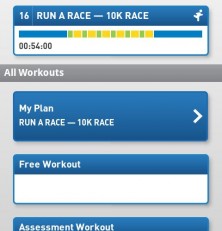
After selecting a plan, the user is then taken to a calendar which displays the plan, including workout length and zone (blue, green, yellow or red). Once a workout is completed, the user can make a journal entry or a simple note about the experience, which is essential for increasing performance. If you don’t know what you’ve done, you can’t make changes to get better. Alternatively, if you forget to turn on the miCoach app, you can manually add a workout as well.
There are many other fun ways to use the website as well, such as the user forums. For the most useful companion website to an app I’ve ever seen, I award five stars.
miCoach
Design
What can I say about the design but that it’s awesome! I love the boot screen with warm and enticing colors. The layout is simplistic yet high tech – buttons and menus are beveled with rounded edges and make use of shading to add depth and style. The main selection screen consists of just four selections which helps keep things simple and easy to manage. Simply put – the graphics are high class and make me feel like I’m using the Mercedes of workout apps. I award five stars for design.
Value
Do I even need to qualify the value of this application? I don’t believe there is a single person alive who could not benefit from using miCoach. Can you walk for just 5 minutes a day? Then you can use this app. Are you a marathon runner? A sprinter? A champion cyclist? A commuter? You get the picture. Anyone and everyone can use this – and it’s FREE! Clearly, miCoach receives five stars for value. So what are you waiting for! Get up and move with miCoach!
Android Apps Review Details: miCoach Android app is free. This app requires Android 2.1 and up. You may download miCoach from the Android Market.
This Android app review, as well as the other Android app reviews for droid phones and droid tablets on this site, are brought to you by AndroidAppsReview.com.











