


Written Android App Review
Frozen Bubble Plus Android app looks like a cheap rip-off of the classic bubble pop which initially started the bubble popping craze. While the graphics may have been acceptable then, they certainly are not acceptable by today’s standards. However, if you’re feeling a little nostalgic, are colorblind, or just want to play a bare-bones bubble pop game, then this is the Android game for you.
Gameplay
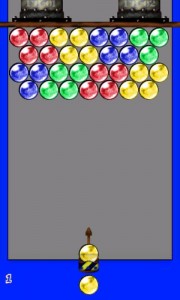
I fully explored this Android app during the Android apps review, and as with any good bubble pop game, the objective is to clear the screen by firing a small orb (bubble) at the patterned orbs (bubbles) at the top of the screen. Like colors go with like colors but there must be at least three for them to “pop” and fall off the screen. The levels start off easy then gradually increase in difficulty.
Frozen Bubble Plus
Oddly enough, this Android game has a colorblind mode as well. The menu offers several options for the game, but I was surprised to see a colorblind mode, so I tried it. It simply provided the orbs with an overlay of symbols (triangle, circle, square, etc.) so colorblind people could match shapes instead of colors. Of course, my initial thought was, “Why would a colorblind person download this game to begin with?” This features isn’t mentioned on the Android Market page – in fact, it really doesn’t say anything at all about the game.
Another odd function is a “Fullscreen On/Off” toggle. Taking it out of fullscreen simply allows the task bar at the top to appear. This is definitely a feature I don’t see a use for. If I’m playing a game, I’m not going to stop because I got a notification in my taskbar.
For the lazy man, there is also a “don’t rush me” option which turns off the timer that lowers the bubbles towards their doom if you don’t clear the board fast enough. But isn’t that half the fun? This is yet another feature I can’t find a practical use for.
Perhaps the only two good options in this game are the ability to turn the sound off and to select your level. One note about the latter though – it will only allow a player to select up to the highest level they have beaten. Sorry – no skipping ahead on this one. It merely prevents the player from having to repeat elementary levels upon returning to the game. That is, IF they return to the game.
Technically speaking, the game plays as it should, but due to the useless features, I am deducting two stars for gameplay.
Graphics
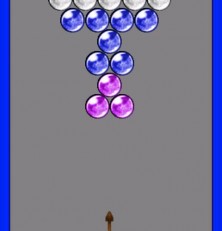
The graphics on this Android game are on par with what I would expect from a five year old crayon drawing. The graphics are entirely rudimentary and boring. The bubbles are of elementary graphical level as is the shooter. The game board is a plain gray background set on a hideous bright blue background. The menu appears to be done by someone with elementary coding skills as well. If I could award zero stars, I would. Since I cannot, however, I will award one star for graphics.
Value
Thankfully this game is free. That is likely the only value this game has unless you are colorblind. I award two stars for being free and for having relatively challenging puzzles later in the game.
Android Apps Review Details: Frozen Bubble Android app is free. This app requires Android 1.5 and up. You may download Frozen Bubble from the Android Market.
This Android app review, as well as the other Android app reviews for droid phones and droid tablets on this site, are brought to you by AndroidAppsReview.com.







how many levels are they? im on level 530 just want to know how many more i have to beat until i defeat the whole game
IM ON LEVEL 714….how many more are left?
There are 1,016 levels. I finally finished last night.