



Written Android App Review
My entire life I have always been the kid with a book in my hand, and Oh! what I would have given for this Android app. No matter where we went, no matter what the occasion or trip, if you looked closely you would find that I had at least one of my soft cover friends along for the ride. The only problem was that it was next to impossible for me to keep enough books on hand. What took other people days to read, I could finish in a few short hours. Long car trips (and even longer vacations!) spent reading the same two or three books over and over were not happy times for me.
Enter the Nook!
As soon as I heard about this new gizmo from Barnes and Noble I had to have one. Pre-ordered on day one and could not wait for my box to arrive. Now, instead of having just a book or two hiding out in my bag, I get to take my entire library with me every time I walk out the door. Joy! Today I am hoping to spread that joy by taking a look at the new Nook Android app. As a dedicated Nook user, I will admit that this Android app has a lot to live up to. Let’s go see if it is up to the job.
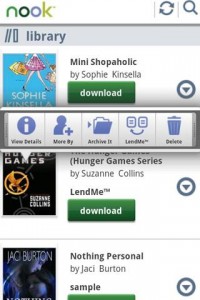
Nook
Features
In terms of features, the Nook Android app is very much like the actual Nook, which is a good thing! All of your purchases are instantly available for download and your account syncs to all registered devices. I also love the lending feature which is unique to the Nook family. This feature allows the user to lend out a piece of their library via e-mail for a two week time period. Then, at the end of the two weeks, the book pops back up in your library like it was never gone in the first place. The only downside here is that any newspaper or magazine subscriptions that you might have are only available on the hi-res Android tablets. I understand that it’s harder to make things work in at a smaller size, but this is a bit of a bummer.
Functionality
This is the area where things get a little sketchy. When I loaded the app on my Android, I expected big things…I just didn’t get them. It’s one of those apps where things work great half of the time, and the other half they just don’t work at all. Also, adding the Nook to my Android seemed to slow down the overall device quite a bit. This was disappointing to me, because I really wanted this to be a 5 star review, and its just not going to turn out that way.

Nook for Android
Book List
Book List? Unmatched! With over 2 million titles and counting, the Nook has no shortage of great material. One of my favorite things to do is go back and look for some of my old favs from great authors. They usually come with a wonderfully cheap price tag and make great additions to my library. For example, how about all 14 books in the original Wizard of Oz series for a whopping $.95? And that’s not each, that’s total!
Value
At the end of the day, this app is a great value. Yes, there are bugs, but they will end up getting ironed out and soon the Nook Android app will be just as great as it’s stand alone brother. Plus, when you download the Android app you are given 5 free books to get you started. This is the perfect way to “try before you buy” and let you get a feel for the Android version and how it works. Then, once you know you love it, you can start adding some of your own goodies, one book at a time!
Android Apps Review Details: Nook Android App is Free. This app requires Android 2.1 and up. You may download Nook from the Android Market.
This Android app review, as well as the other Android app reviews for droid phones and droid tablets on this site, are brought to you by AndroidAppsReview.com.









Nice post. I was checking continuously this blog and I’m impressed! Extremely helpful info particularly the last part I care for such information much. I was seeking this particular information for a very long time. Thank you and best of luck.