


Written Android App Review
As spring turns to summer many of us turn to the mirror and take a closer look at our waist lines. The time for skimpier clothes and beach vacations is fast approaching. Wouldn’t it be nice to know if your food is on your side in the war with the scale? Instead of crunching numbers each time you take a bite, put Honest Label Android app to work for you. This free app from Honest Label Foods will tell you what you really need to know about your food before you eat it.
Honest Label
Features
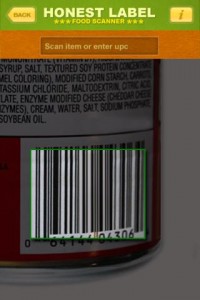
After performing the Android app review I learned that a simple tap of the green Honest Label icon will launch this Android app. Select “Scan Product” to begin investigating the nutritional properties of your dietary selection. Position your Android’s camera lens over the product’s barcode or tap the UPC blank to enter the numbers manually. If you experience any trouble scanning items or want to know more about using this feature, tap the handy info icon in the upper right-hand corner for user tips and tricks.
Once it captures your food’s barcode, Honest Label searches its food directory and brings back useful information. If your item is high in fat, sodium, sugar or another questionable substance, Honest Label will bring that to your attention first in their colorful summary page. Tap additional subheadings such as “Ingredients” and “Vitamins” for additional information.
Honest Label also allows users to customize their results. Tap “Customize Profile” on the first page of the app to enter your daily targets in calories, fats and several other important nutritional categories. Once you do this the percentages in scanned food label results will apply specifically to your parameters. Without customizing this setting Honest Label assumes a 2500 calorie a day diet.
This Android app does not save your entries to provide an estimate of your total daily intake based on scans. It will allow you to peruse past scans if you select the menu button.
Stability
I am not a big fan of barcode scanners in general. The positioning and lighting needs are so specific that I end up frustrated when using them. The Honest Label Android app is not an exception to this rule. When it works, it works very well. My phone went from scanning to sharing information in a matter of seconds. When it doesn’t work, it’s better to cut your losses instead of waiting endlessly for it to try over and over again to scan.
Honest Label is a new Android app and I’m afraid to say, sometimes it shows. Attempting to access the menu and settings occasionally crashed the app.
Value
With a little effort Honest Label could be a stellar application. Unfortunately, that effort may end up being yours. Several of the items I scanned did not have any information in the Honest Label app catalog. There is a nice option where you may scan the item’s information to help flesh out their food information logs or add items manually, but that isn’t my idea of efficiency or value.
Android Apps Review Details: Honest Label Android app is free. This app requires Android 1.6 and up. You may download Honest Label from the Android Market.
This Android app review, as well as the other Android app reviews for droid phones and droid tablets on this site, are brought to you by AndroidAppsReview.com.











