Written Android App Review
Altitude, latitude, and a lot of attitude can be yours with GeoCam Free Android app from Wazar, a camera app that displays location information while you shoot your pics. If you are looking for a little help with your Android camera or more options when shooting photos, give GeoCam a try.

GeoCam Android app
Features
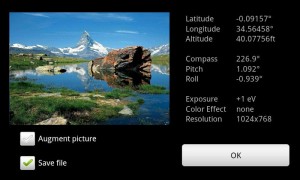
While using GeoCam Free for my Android Apps Review I took pictures in several different locations. The camera enhancing app displayed my latitude and longitude right on the screen while I was snapping shots. It also displayed useful factual information about the picture I was taking, such as the angle I was holding the phone in, the height of my shot and the nautical direction my Android phone’s camera was facing.
Users may also alter the color of the displayed readings, quality of their pictures, image effects and units of measurement that are used. One of GeoCam’s more interesting features is the ability to export pictures and picture information to a file that may be displayed on a computer via Google Maps or Google Earth. The “Read Bearings” feature allows you to view a snap shot of helpful location information.
I sincerely wish this app had an option to decide where pictures are saved once they are taken. It was not hard to find them on my Samsung Fascinate, however without an additional file search application they were impossible to locate on an HTC Incredible. There were simply no pictures taken by GeoCam Free from Wazar in the gallery.
GeoCam Android app
User Experience
GeoCam Free’s user interface seemed simple enough at first glance, but when I went digging for extra features it took me a few moments to find my way. Tap the camera icon in the upper right-hand corner to take a picture. Select your option preferences on the review screen while viewing picture information. That is all clear enough.
My confusion was in the settings menu, which users may access by pressing the arrow on the right side of the screen. There are three different option tabs, “Cam,” “Geo” and “Set.” In each of these tabs there are additional tabs of options on the right-hand side, each opening up additional options, creating a sort of grid layout of options. Each tab uses different right-hand icons for navigation. I found it a bit unwieldy.
As with any GPS-dependent app, some user functionality will vary depending on the quality of your Android’s GPS.
Value
GeoCam Free from Wazar is free. You all know how I feel about free, it’s fantastic! I do hope this Android app gets some upgrades and resolves a few of the above mentioned issues, as the features are pretty interesting. I did receive a few force close errors, especially while trying to bring up pictures on Maps and export images with information. The lost pictures on the Incredible also dampened my excitement.
Android Apps Review Details: GeoCam Android app is free. This app requires Android 2.d and up. You may download GeoCam Free from the Android Market. iPhone owners may also enjoy GeoCam!
This Android app review, as well as the other Android app reviews for droid phones and droid tablets on this site, are brought to you by AndroidAppsReview.com.