


Written Android App Review
Can an Android app help you lose weight? This Android app review aims to find out.
If you’re like most people, you’re probably looking to lose a few pounds before summer hits. However, carrying around a notepad, pen and calculator at all times probably isn’t your idea of fun. Not to mention how embarrassing it can be when you go out to eat and have to try to write down or remember what you ate so you can enter it later. When others know you are actively dieting, the scrutiny over everything that goes in your mouth usually begins. This can contribute to failed diets as can excessive hassle.
Calorie Counter
CalorieCount.com recently released an Android app to allow members an easy and discrete way to keep their diet in check. In initially downloaded the Android app first and then visited the website. If you are familiar with SparkPeople.com, this site will seem vaguely familiar to you. While they use a few slightly different methods, their ideology is the same: create a website where members can log calories eaten, calories burned and get overall education and information about dieting and exercise – and make it free.
Features
The first thing I noticed about this Android app was the scale method it uses. After a quick set up, I was shown a scale with the amount of calories it expected me to burn based on my inputted activity level on the left and the calories from food I would later log on the right. Since I have fairly extensive knowledge on nutrition, weight loss and fitness, I recognized its meaning right away. In order to lose weight, one must create a negative net balance of calories in vs. calories out. In other words, you must burn more calories than you eat in order to lose weight. So I thought using a scale visual was brilliant! Even those who don’t formally know this concept can quickly and easily derive an understanding simply based on the graphical scale.
The next feature I noticed was the Analysis area below the scale and, after inputting some meals, noticed how it awarded me a “grade” based on how well I ate. I didn’t end up with an ‘A’ today, but I did get a B+, and that was even with going out to eat. I attribute my good grade to the diet modifications I have made lately, and this was positive confirmation that I am eating better and making wiser choices about what I put into my body. It got my gears turning and, being the overachiever I am, starting thinking about how to make that B+ an A. I suppose this is the point of this part of the app, and I can see why.
But how is this grade calculated? It would appear it is calculated based on the average of the grades each individual food receives. While adding meals and snacks to my food log, I noticed each food item had a corresponding grade. I particularly liked this as it would motivate me to make wiser choices and to ultimately change my eating habits. For instance, instead of choosing a double cheeseburger from McDonalds with an ‘F’ rating, I might be more inspired to simply get the single hamburger which has a rating of a C+. What many dieters fail to realize is that when starting out, even a small change for the better is a change worth making. The next step up would be to make your own hamburger at home from lean beef, which has a rating of a B-. From there, one might make a leap to try a grilled vegetable burger (e.g. a Boca Burger), which has an A rating. Change doesn’t have to be fast, it just has to be consistent, and this app can help you get there.
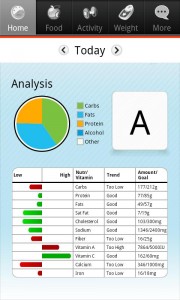
Calorie Counter Analysis
Other features include monitoring weight and activity – did you walk to lunch today? Record it! Also, be sure not to miss the full daily analysis, which will give you a detailed report of nutritional goals and allow you to focus on dietary needs which fall outside the recommended ranges. For positive and educational features, I award five golden stars.
Design
CalorieCount.com’s Android app employs simplistic but clean and visually attractive images and charts. Any colors used serve a specific function in order to relay a visual cue to the user. For instance, on the analysis page, carbs are colored green, fats are blue, proteins are yellow, etc. When placed in a pie chart, the user can quickly see what they’re eating in a snapshot. While there is a lot of information packed into this app, it is not overwhelming, difficult to understand or time consuming. Food can be quickly entered and feedback is immediately available and understandable. The user doesn’t need to understand all the technical aspects of dieting to figure out how to use this app effectively. For that reason, I award five golden stars for design.
Value
Whether you are new to dieting, a dieting veteran, or just want to create a healthier lifestyle, this app can get you started on the right path. And not only is the app free, but the website (which has even more information and features) is free as well. It would seem the most logical way to use this app is as a supplement to using the full website as well. But it can suffice as a standalone app so for that reason, I award five golden stars for value.
Android Apps Review Details: Calorie Counter & Diet Tracker Android app is free. This app requires Android 2.1 and up. You may download Calorie Counter & Diet Tracker from the Android Market.
This Android app review, as well as the other Android app reviews for droid phones and droid tablets on this site, are brought to you by AndroidAppsReview.com.











