Written Android App Review
iWallet is a new Android app designed to help track expenses so you can see where all your money is going. There are a lot of money managers on the market, some of which are quite complex and feature-loaded, but sometimes users just want simplicity or don’t want to input usernames and passwords for all their bank accounts into an Android app, such as Mint or Pageonce (both of which are amazing apps by the way). So if you want to maintain confidence in your privacy and enjoy simplicity, iWallet might just be for you.
Features
First and foremost, let me preface this Android app review by stating that this Android app is for budgeting and recording expenses. It will not keep a running tally of the balance in your bank account when you enter an expense (if you want that, get Ledger) and there are no live feeds from your bank accounts. Simply put, you spend money, you enter what you bought, where you bought it, how you paid for it and what category it falls under (e.g. clothing, insurance, utilities, etc.).
iWallet
In regards to the default Categories, I was slightly surprised that a few common categories were missing. For instance, I had to manually add Dining and Groceries – two very common expense categories, or so I thought. I also had to add ‘EFT’ to the payment options. It had cash, check, debit, credit card and wire transfer, but not EFT. Considering I pay all my bills with EFT, this is an important option to have for me.
iWallet also has a section called ‘Vendor’ which I assumed was meant to be the name of who you spent your money with. This app clearly originated in the UK (evident by the spelling of Check as Cheque) so perhaps vendors is a more commonly used word there. In the US, vendors are commonly references as those places that businesses buy their products from to resell. This may seem a trivial thing, but I can see where this might cause confusion.
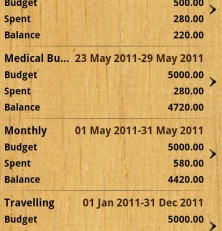
My two favorite features of this app are the expense summary and analysis. The summary is on the home screen of the app and shows how much was spent today, this week and this month. The analysis provides a detailed breakdown of how much you’ve spent, when you spent it and with whom you spent it. If you have created a budget as well (another nice feature), it will compare how much you’ve spent with how much you budgeted for and provide a balance to show if you were over or under budget. Overall, this app has some nice features but could stand some improvement, so I award three stars for effort.
Layout
I’m not sure why the developer chose a wood grain background, but I find it distracting to the information I should be focusing on. I’m sure it was meant to try to make it look classy, but this is a developer 101 No-No. The rest of the app was done quite nicely so far as layout goes. There are appropriate and well formatted tabs along the top and bottom, depending on which page you are on. I would like to see more consistency on which pages have which tabs though and feel every page should have the lower tabs featured on the main page. What few icons and graphics are used are simplistic and non-intrusive. Nice, but a little plain. Unfortunately, I can’t get over the background and the lack of consistency bothers me, so I award three stars for layout.
Value
As I said before, if you want a simple and lite Android app to quickly and easily manage your budget and expenses, then try this app. It’s free so it won’t cause any additional strain on your wallet. However, if you want a more feature-rich money manager, there are dozens of other options out there. Overall, this iWallet receives three stars for value since there are a number of other (and better) apps available on the market.
Android Apps Review Details: iWallet Android app is free. This app requires Android 1.6 and up. You may download iWallet from the Android Market.
This Android app review, as well as the other Android app reviews for droid phones and droid tablets on this site, are brought to you by AndroidAppsReview.com.