Written Android App Review
Ever feel at a complete loss about what to make for dinner? How about breakfast? Lunch? Snacks? Fear no more, AllRecipes Android app is here to save you and get dinner on the table in time. AllRecipes.com is the worlds #1 food and recipe website. While the free version has been out since the end of March, the Pro version was just released for Android. Dinner Spinner has been available for iPhones and the iPad for quite some time, so I was excited to finally see it available as an Android app.
Features
My Android app review revealed that Standard features, which are included in the free version as well as the pro version are, of course, the spinner, a filter for special dietary needs (such as vegetarian, no dairy, low fat, etc.), a search function, favorites and a featured option. The pro version introduces a number of extra options:
- Create shopping lists directly from recipes – the app will even combine multiple ingredients into one for easy shopping.
- Access to your personal Recipe Box from the AllRecipes.com website
- Input the ingredients you have on hand to help find a meal
- Enhanced sharing capabilities – now you can share recipes through email, Facebook, Twitter
- No ads!
- Best of all – the kitchen view that has helped make AllRecipes.com so popular is also available in the Pro version.
For those who aren’t familiar with AllRecipes.com or the free version of the dinner spinner, let me explain how it works. First of all, you need to create an account on AllRecipes.com in order to utilize some of the functionality such as the recipe box. After that, how you use the Android app is up to you.
All Recipes
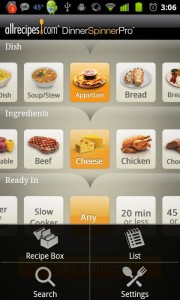
The dinner spinner is an amazing feature and is at the heart of the Android app (hence the name). There are three bars: Dish, Ingredients, and Ready In. A simple shake of the phone will have the three bars spinning across the screen and randomly landing on a selection in each category. This is useful if are simply trying to get ideas for new meals, but don’t have a specific meal or purpose in mind. Now lets say its almost dinner time but you haven’t decided what to make yet. Let’s assume you have a few varieties of meat on hand and at least an hour before dinner. You can manually select ‘Main Dish’ from the top row, then shake, spin and click ‘View Matches’ to get a quick idea for dinner.
Now let’s suppose it’s dinner, you only have chicken meat available and you need it in 20 minutes or less. You can manually select ‘Main Dish’, ‘Chicken’, and ‘20 min. or less’, then hit ‘View Matches’. This is certainly more specific and a quick way to get an idea for what you already have available. Still not enough? What if payday is a week away and you need to make dinner with limited ingredients? Simply use the search feature, enter up to eight ingredients you have on hand, and receive suggestions right away.
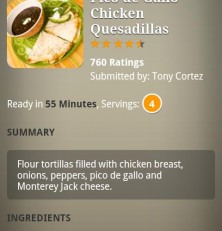
Also worth noting is the kitchen view feature. If you have never used this, you are missing out. No more giant cookbooks taking up precious counter real estate. No more index cards or scraps of paper floating around with recipes on them. I have been using the kitchen view on my netbook and later my tablet for some time by just logging into the website. But these still take up counter space. By using the Dinner Spinner on my phone, I can simply put the phone in my pocket once I’ve looked at the next step. No wasted counter space!
There are a lot of great features in the Pro version, which is designed for AllRecipe.com users. For increasing functionality, I award 5 golden stars.
Design
Overall, this is one streamlined, good looking application. This really shouldn’t come as a surprise though – the website is well-designed as well. Gray shades can be difficult to pull off, but AllRecipes did a great job at it, making the entire Android app look clean and professional. Recipes have good pictures and recipe layouts are easy to read. My only complaint is the kitchen view, which just feels awkward. The large white block is a little overwhelming on short directions. You have to scroll up to see the ingredients and each step has it’s own page, which I also find awkward. For this, I am deducting half a star for design.
Value
What could be more valuable than being able to put a hot dinner on the table after a hectic day and not have to stress over what to make? The pro version of the Android app can be purchased for just $2.99 but of course you can always use the free version if you don’t need all the extra features. For making meal time as easy as spinning a wheel, I award 5 stars for value.
Android Apps Review Details: AllRecipes.com DinnerSpinner Pro Android app costs $2.99. This app requires Android 2.1 and up. You may download AllRecipes.com DinnerSpinner Pro from the Android Market.
This Android app review, as well as the other Android app reviews for droid phones and droid tablets on this site, are brought to you by AndroidAppsReview.com.