Written Android App Review
Combine the best parts of your Android’s GPS functionality and snappy camera skills with GeoCam, a geographical camera enhancing Android app from SITIS. Let’s face it, there are a lot of Android apps out there that claim they can enhance your camera’s abilities. I’m happy to report that GeoCam from SITIS walks the walk. Read on to find out how.
GeoCam
Features
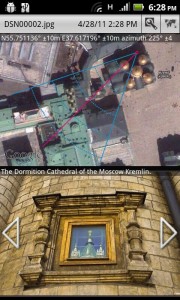
For my Android Apps Review GeoCam interfaced seamlessly with my Android’s camera to take pictures. That is where the similarities between GeoCam and your phone’s existing camera end. You may use GeoCam to capture information you didn’t even know your phone was capable of capturing.
While using GeoCam to take a picture the screen advises you of your current latitude, longitude and the degree of accuracy you can expect from your Android’s built in GPS system. It also has a second row of data advising you of your azimuth (direction), pitch and roll of their geographical photo endeavors.
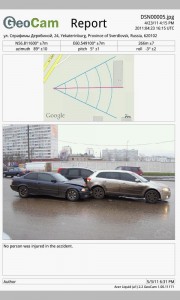
Beyond just snapping an extremely informative photo, GeoCam allows users to view a detailed report of their image. Reports include all of the on-screen information from GeoCam, distance reports, mapped details and more. You may export that report as a PDF to share and send, opening up a world of possibilities. Photo sharing is also enabled. Next time you go geocaching this app will be indispensable.
I wish GeoCam had an option to take pictures in portrait as well as landscape, though it wasn’t a huge nuisance. I’m a casual Android photographer, and GeoCam helped me even up my shots in a matter of seconds. Imagine what this app could do in the hands of a professional.
GeoCam
Practical Application
Professionals and enthusiasts alike will agree with me when I say GeoCam has a lot of practical applications. Consider using GeoCam’s proximity capture to photograph automobile accidents for insurance purposes, or to report land features for mapping projects. Landowners can use GeoCam to help map out additions, structures or fences. Realtors can use this Android app to clarify concerns with clients by sending images with technical specifications attached instantly. On a more social level, use GeoCam to share photos with friends that show them exactly where you were. This is the perfect app for hikers, bikers or geocache fanatics.
Layout
I was extremely pleased with GeoCam’s layout and design. There are no fussy icons or ads cluttering up my camera screen. On-screen data is kept small and inconspicuous. I actually like the camera view better in GeoCam than I do in my regular camera app.
Exporting, saving and changing settings are all very easy to get to. While viewing a report, you may change the color scheme to improve visibility, or use the zoom feature with ease. GeoCam’s developers definitely put some thought into their app’s user-friendly design.
Value
GeoCam from SITIS is free and fabulous. The more I used it the more impressed I was with the app’s abilities, clarity and ease of use. It is also an extremely stable app. I did not experience a single crash. In other words, high marks for value. GeoCam is a gem.
Android Apps Review Details: GeoCam Android app is Free. This app requires Android 2.1 and up. You may download GeoCam from the Android Market. For a full review of GeoCam for the iOS please visit TheiPhoneAppReview.com. The developer paid a nominal fee to speed up the publication of this review.
This Android app review, as well as the other Android app reviews for droid phones and droid tablets on this site, are brought to you by AndroidAppsReview.com.