


Written Android App Review
Have you ever wished you had a little more control over how your Android phonebook is displayed and which pictures it chooses for your friends? The default Android phonebook pulls the profile picture of those contacts you have in Facebook and displays it as a thumbnail. PicDial does this, but with a bigger picture. Oh, and they include MySpace photos too. This doesn’t impress me, but a few of the features are actually helpful. Read on for the entire Android app review.

PicDial
Features
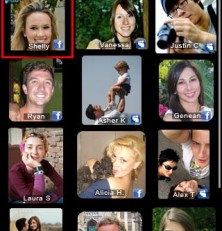
PicDial Android app creates a home screen of your hand-picked ‘favorites’ and prominently displays either their profile picture, or another picture of your choosing (from your phonebook). The idea is that when that person calls, it displays their name, phone number, a large picture of them, and their latest status update on Facebook or MySpace.
Now I must say, the status update part might juts be a lifesaver. Let’s say you’re a guy and your girlfriend calls…and she’s pissed. Without this app, you might answer in your normal fashion, not being any the wiser. But if her latest Facebook post is a rant about what a jerk her boyfriend is… well, you might just have a fighting chance now. You can now be prepared for pissed off girlfriend and, if you play your cards right, even turn a bad situation into a good one.
Another good use could be for a birthday. Perhaps its your buddy’s birthday, but you forgot. If you’re lucky, they posted something like “Thanks for all the birthday wishes” on their Facebook. Now you can answer the phone with, “Hey! I was just getting ready to call you to wish you a happy birthday!” Friendship saved.
Another handy feature in this Android app is an auto-reply which will also auto-update your Facebook and/or MySpace with your status if you are busy. For instance, I could change my status to “Writing – do not disturb” and it will update my Facebook as well as notify any inbound callers who also use this app that I am busy.
But do you see the problem? Some of the features, like the one I just mentioned, requires that the other person has the Android app as well. One plus to having the app though – you get to control which picture shows up on your friend’s phone.
I do have one big problem with this Android app though. There is no quick-dial widget or quick link or anything of the sort. To make a call from the app, you first have to open it. It seems it would be more prudent to create a widget for faster dialing. The favorites page is a nice idea, but without easy and immediate access, I am far less likely to use it. Overall, I give features three stars.
Design
Overall the Android app has a clean layout, though it is a bit slow to update profile pictures when adding favorites. Once loaded though it works like a charm. The favorites page shows which contact is on which social network and will even display their status message if their picture is selected. However, the profile thumbnails are a bit on the large size, which seems unnecessary. Also, when someone calls, the profile picture is quite large and if the photo or image is low-quality, it stretches the image and makes it look pixelated. Some fine tuning here would be useful, but there is promise. I award four stars for design, leaving room for improvement.
Value
Honestly, I am just fine with my phonebook as it is and see no reason to have blown up pictures of my friends when they call. I check Facebook regularly enough to know when things are going on and I don’t use MySpace at all anymore. So in my opinion, this is overkill, even if it is free. I therefore give PicDial three stars for value.
Android Apps Review Details: PicDial Android app is free. This app requires Android 2.1 and up. You may download PicDial from the Android Market.
This Android app review, as well as the other Android app reviews for droid phones and droid tablets on this site, are brought to you by AndroidAppsReview.com.











