


Written Android App Review
Would you be able to track the location of your Android phone if it was lost or stolen? With Prey, a free app for the Android OS, users can remotely activate their phone and get reports on the phone’s location and Internet IP address.
Features
Initially, you will need to setup an account for your device with Prey. This can be done through the app and with the app’s website . They don’t require much information for the account, making registration a snap.
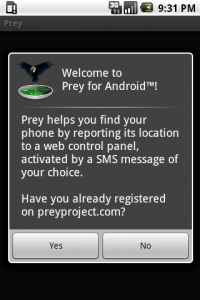
Prey App
When you start the app, you must first enter your login password. This is a nice additional layer of security to prevent a would-be thief from changing the app’s settings in the first place. Then, you can choose from changing the SMS activation and deactivation messages, controlling notifications about SIM card removal, stop or start Prey, and manage your Prey account. Editing the SMS message allows you to choose exactly what text will ‘wake up’ Prey on your Android, when received as a text message. By default, this is set to “GO PREY.” Another option that would be nice for free users is to allow activation of Prey directly from the online control panel without having to send a text message.
The SIM card removal feature is there to allow notifications to be sent to you in the event of someone removing your phone’s SIM card. This doesn’t have to be turned on, but it’s a useful feature none the less.
So, what exactly does Prey do once activated? Users can choose from an array of options through the Prey online account management. By default, Prey will gather Geolocation and Network information once the phone is marked as ‘missing.’ These are then sent to you, the owner of the phone, via emailed reports. Users can choose to edit the duration between reports and other actions that can be initiated once the phone is marked as missing.
Graphical Layout and Sounds
Prey has a super basic, yet easily accessible layout. There isn’t any flash graphics or slick animations. That being said, the app doesn’t look unpolished or amateur. Rather, the app uses a plain black background combined with an easy to navigate menu. Users shouldn’t have any problems changing the settings or finding their way around the app, even for first timer users. Sounds are not really a part of Prey. However, you can choose to enable in-phone alarms if you the phone is marked missing. Popup alerts and phone locks are also available as options if you really want to mess with an Android thief.
Value
For a free app, Prey is certainly impressive. It’s usefulness in potentially being able to help one recover their lost or stolen Android device is fantastic. The ease of choosing what kind of settings are used via any Internet connection is great and the array of options are nice as well.
Initially, free users are limited to 3 devices and 10 reports from Prey. However, users can choose to upgrade to Pro plans, with different plans for different numbers of devices and more reports. Pro accounts are subscription-based (monthly) and range from Personal to Max (probably only useful for corporations).
While the best way to recover a device is to prevent it from being stolen in the first place, Prey adds an additional layer of security to your Android device. It’s definitely worth checking out and certainly has given me more peace of mind regarding the security of my phone!
Android Apps Review Details: Prey Android app is free. This app requires Android 1.5 and up. You may download Prey from the Android Market.
This Android app review, as well as the other Android app reviews for droid phones and droid tablets on this site, are brought to you by AndroidAppsReview.com.








