Written Android App Review
The GO Launcher Development Team has finally solved an Android problem which has plagued users since the first Android device was created: a functional yet aesthetically pleasing calendar widget. If you haven’t tried out GO Launcher EX yet, you NEED to! The calendar widget is just one of many plugins which works alongside GO Launcher and is not only ridiculously useful, but pretty to boot. Trust me, I have tried dozens of calendar apps and widgets, but this one takes the cake. Let me show you why.
Features
Calendar GoWidget
Have you ever used the default calendar widget on Android? Ugly, isn’t it? Not only is it ugly, but it doesn’t do much and, quite frankly, simply isn’t useful. So what does Calendar GoWidget have? Let’s take a look:
- Month view: If you’re anything like me, seeing just one day at a time simply isn’t enough. Even one week at a time isn’t enough and I often find myself dissatisfied with apps because the monthly view is useless for anything but finding out what day a particular date falls on. This widget not only displays the date, but also puts a tiny yellow triangle in the corner of any day you have something scheduled. Today’s date is circled in red as well, so you are given two visual cues right away: 1) Today’s date/day and 2) whether you have anything scheduled for that day.
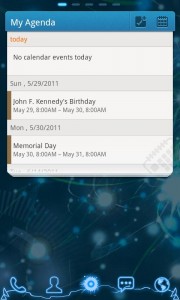
- Daily Agenda: Now suppose you are looking at today, which is circled in red, and it has a yellow triangle in the corner, but you don’t remember what you scheduled! Simply touch the circled date and it will instantly show you the day’s agenda. If you have multiple Google calendars, you will notice that next to each item, there is a colored bar on the left-hand side. This bar matches the color-coding you gave your Google calendar. Cool, right? Editing your agenda from here is simple as well. Just tap the event and you will get a full-screen view with all the details, including the ability to edit.
- Scrolling Monthly Agenda: This feature is accessed by touching the calendar icon in the upper right-hand corner of the widget. The monthly calendar will shrink up and your detailed monthly agenda will drop down. Simply slide your finger up or down to scroll through your full agenda. This is the fastest way to get a glimpse of what is coming up this weekend or to take a peek at the rest of the month. Again, the color coding applies here as well, making visual scanning a cinch!
- Add agenda: That’s right, you can even add a new event directly from the widget. Simply click on the icon which looks like a notepad with a checkmark and plus sign and a new full-screen window will appear to allow you to enter all the details and reminders you need. No more navigating multiple menus just to add a new event! Don’t worry, you can thank me later.
I only have caveat with this GoWidget – the scrolling monthly agenda shows the entire month, starting on the first day. It would be nicer if it started on the current date. It is unlikely anyone is going to care what was on their schedule last week. For this, I am deducting half a star. I have no complaints about the rest of the features!
Design
I’ve said it once, I’ll say it again – this is one slick-looking calendar widget. Others have tried, and have gotten close, but this one is simply perfect. The top bar is a nice shade of blue, which is slightly longer than the calendar part, which aids in the fantastic drop-down effect this app uses. Switching views causes the white calendar to scroll up into the blue bar and then drop back down with the accessed feature. The motion is fluid and impressive every time I see it. The calendar blocks are exactly the right size and the scrolling agenda is highly responsive. The colors are clean and the text is easily readable. I give Calendar GoWidget five stars for design!
Value
If you have no use for a calendar, then it is unlikely you are even reading this. For everyone else, this is THE calendar widget to have. Unlike most, it is not an app all on its own. It literally integrates with your existing Google calendar in the most efficient way possible. Since I started using this app, I have never had to go through my apps to get to any special calendar program. I literally do everything straight from my homescreen. Calendar GoWidget gets five stars for value. Honestly, I don’t know how I ever lived without it!

Android Apps Review Details: Calendar GoWidget Android app is free. This app requires Android 2.0 and up. You may download Calendar GoWidget from the Android Marketplace.
This Android app review, as well as the other Android app reviews for droid phones and droid tablets on this site, are brought to you by AndroidAppsReview.com.