Written Android App Review
The GO Launcher Development Team has done it again with one of their newest widgets: the Message GoWidget. If you haven’t tried out GO Launcher EX yet, you NEED to! The message widget is just one of many plugins which works alongside GO Launcher and is not only ridiculously useful, but pretty too. I would also highly recommend you use this widget in conjunction with GO SMS Pro, a free, full-featured text-messaging application.
Features
Message GoWidget
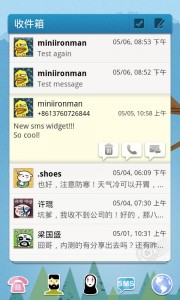
No longer are you required to open a separate texting application simply to send, read, or reply to a text. This is still an option, of course, but you won’t have to if you use this widget. That’s right, you can do everything you need to do, right from your home screen.
- View: This widget will let you view not only the last message you received, but all the ones before it, simply by sliding your finger up or down on the widget. Each message can be replied to or deleted using this scrolling feature. When a new message comes in, a notification window will appear, even if your phone is asleep. This helps speed up the process even more, creating a more efficient texting experience.
- Reply: In the upper right hand corner of the widget is an icon shaped like a envelope with a directional arrow. Pressing this will open a special window which allows you to quickly compose a response. Simply press the paper airplane icon when finished and off the message will go!
- Delete: Once you have decided you no longer need the message you’ve received, press the trash can icon to quickly delete the message. Don’t worry, you can’t accidentally delete anything – pressing delete will trigger a confirmation box to make sure you meant to delete the text.
- Mark as Read: If you don’t need to reply or delete a message right away, simply touch the checkmark icon. This will remove the ‘New’ notification and mark it as being read. It really doesn’t get much simpler!
- Call: Suppose someone sends you a text saying, “Call me”. Previously, I would have had to then close the message, open my phonebook, find the number and press call. Well, no more! Now all I have to do is touch the person’s display picture on the widget and an option list will appear. I can choose to call them directly from the widget, view their contact details, or if I have GO SMS Pro (which I do), I can open it and interact with my contact that way!
- New Message: This feature, oddly enough, is only available on the 4×4 size and not the 4×2 size. There is a workaround, however. GO Launcher (which is required for this widget) allows for widget resizing. It also allows for adding extra home screens. Add an extra home screen (if you don’t have a blank one open), and then long press on the screen. Select the 4×4 version of the GoWidget. Once it is on your screen, long press on the blue bar and select ‘resize’. Change it to whichever size suits you then drag and drop the widget on whichever screen you wish. Of course, if you want the 4×4 version, that’s great. Personally, I don’t like taking up a whole screen with one widget. In the upper right hand corner, you should now see an icon with a pencil and notepad. This is what allows you to compose new messages directly from the app.
The only think lacking in this widget is the ability to compose a new message from the 4×2 version. Therefore, I am deducting half a star for features. Otherwise, I have no complaints!
Design
Like the other GoWidgets, this one uses a blue top bar and a clean, white background. The messages are easy to read and the scrolling functionality is smooth and flawless. Contact pictures are small yet functional and all pertinent features and options are only a touch away. If you use other GoWidgets, the layout is familiar, but even if you don’t, it is easily learned. I award five stars for design!
Value
Who doesn’t text in today’s society? Whether you just need to convey one thing or carry on a conversation when talking isn’t practical, texting has become the primary function of almost every cell phone. It only makes sense, then, to have all your texting needs literally at your fingertips. Message GoWidget takes care of this need quite nicely and therefore deserves five stars for value.

Android Apps Review Details: Message GoWidget Android App is free. This app requires Android 2.0 and up. You may download Message GoWidget from the Android Market.
This Android app review, as well as the other Android app reviews for droid phones and droid tablets on this site, are brought to you by AndroidAppsReview.com.