


Written Android App Review
There’s no doubt about it – we are a society of tracking fools. We track our weight, diets, exercises, books we’ve read, books we want to read, movies we want to see, daily vitamins… you name it, someone tracks it! I must confess I am a habitual tracker as well and often have multiple programs, Android apps, websites and even hard paper copies of things I am tracking. Well no more. KeepTrack Android app will literally track it all for me, and then some.
Features
My Android App Review uncovered that there are three types of tracking this Android app can do:
- Numerical – Obviously, this would be any data which uses numbers, such as recording your weight, how many pushups you did, or even how many flowers you stopped to smell. The choice is up to you.
- Boolean – These are Yes or No questions. Did you take your vitamins today? Did you wash the car this week? Did you call your mom this month?
- Text – This option may be used less than the others but allows you to record things such as daily thoughts, special moments, ideas, etc..
KeepTrack
Trackers can recur on a daily, weekly, or monthly basis. Each tracker allows for reminders as well. You can set it to remind you once a day at a set time or add multiple reminders if necessary.
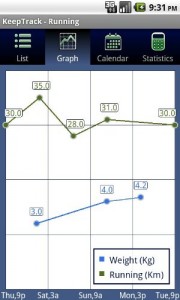
Within each tracker is a whole slew of reporting features. Use the graph to to compare your pushups versus sit-ups. Look at the calendar to see what great ideas you had last week. Take a look at the statistics screen to get detailed statistics, overall value ranges and time ranges. Some values can even be shown in a pie chart.
KeepTrack also has the ability of exporting and importing data. Exports can be in XML (which is required for importing) or text, which is useful for dumping into a spreadsheet. There are even more features in the Pro version ($1.99 from the Android Market). Since I am reviewing the free version and there are features in KeepTrack Pro which are not available in the free version, I give 4 1/2 stars for features.
Design
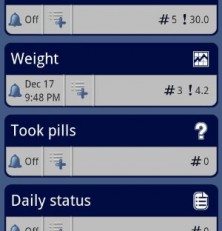
I’m a little torn on the design of the app. The screen which houses the statistics, calendar, graphs, etc., is well designed. It is easy to read and attractive. However, the main screen which shows what items are being tracked seems blocky and bulky. While it does the job, I feel it could be more visually striking than it is now. For that, KeepTrack loses a star. Overall though, the app is easy to navigate and date is presented in a clear and concise way. KeepTrack receives four stars for design.
Value
I don’t know about you, but the ability to keep everything I need to track all in one place is invaluable. I have several diet and fitness apps (and yes, I use each one), as well as other various apps used for tracking. With KeepTrack I can eliminate almost all of them and have one simple app to rule them all. KeepTrack receives five stars for value – I might just go buy the Pro version now.
Android Apps Review Details: KeepTrack Android app is free. This app requires Android 1.6 and up. You may download KeepTrack from the Amazon Appstore.
This Android app review, as well as the other Android app reviews for droid phones and droid tablets on this site, are brought to you by AndroidAppsReview.com.











