



Written Android App Review
I like being able to scan through articles and choose the ones that pop out at me and I’m not a fan of sitting back and watching as other people read the news to me. Now, the downside of these very specific likes and dislikes of mine is that I have ended up with several different Android apps loaded onto my Android which are dedicated to bringing me the latest and greatest when it comes to the news. It’s bulky and its time consuming, but its the only way for me to get the exact mix of news that I am looking for.
At least it was until I found out about the Pulse News Android app!

Pulse News
My Android app review found that Pulse News is this unique Android app that allows you to connect to all your favorite news outlets with one simple step. Facebook, Time, Vanity Fair…they are all here and they are all ready and waiting for you to browse. Sound too good to be true? Well, it might just be. Let’s go see just what Pulse News might have up its sleeve.
Features
When talking about Pulse News, features are far and above the best facet of this Android app. Why? Because Pulse News has features to spare!
In fact, that’s kinda the whole point. Pulse News is designed to give you everything you could possibly want on the news front all in one central location. The Android app is easy to use and it has a straight forward set up that makes adding content a breeze.
To keep things simple, here is a quick list of the features you will find with Pulse News:
- Offline Sync - Articles you like will be loaded to your Android so that you can view them even when you have no Internet connection.
- News Discovery - Search for new content
- Easy Share - Share articles with two taps of your finger
- Full Integration with Google Reader
What do I love about Pulse News? I love all the features and I love how I control the mix of what pops up on my Android device. Some content interests me…some doesn’t…the point is, I’m in control!
Functionality
Pulse News
Well, we’ve gone over all of the things that I love about Pulse News, now its time to move over to the dark side for a bit. While I would love to sit here and tell you how great the functionality was for Pulse News I just can’t. Not just because there were a few issues with functionality, but also because Pulse News has gone way overboard when it comes to permissions.
First off, the Pulse News Android app had a tendency to freeze during the review process. It felt like things would just get rolling when the Android app would lock up and we would have to start all over again right from the beginning. That is not fun, but its honestly something that I can deal with.
Why? Because with Android apps like this, these types of functionality issues are usually transient and quickly fixed. It is truly the permissions that I can’t get past. First, the list is long and there are several that there are simply no need for. Such as, why in the world does Pulse News need to know my fine GPS location?
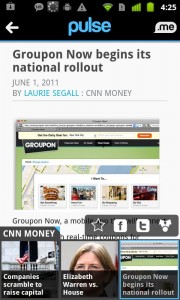
Also every time I opened the Android app, I felt like Groupon was being shoved down my throat and there was no way to get away from it. If I want Groupon, I’ll go find Groupon…there is no reason to force it front and center every time I turn around.
Share Worthiness
With all the highs and lows, the real question is would I share Pulse News? Honestly? No. In this case the permission are just more than I want to deal with and more than I want to push off on others. I can see how Pulse News offers a great service, one that I would love to take advantage off, but the cost hugely out weighs the benefit. Fix the permission issue and I’ll be much more impressed.
Pulse News
Android Apps Review Details: Pulse News Android App is free. This app requires Android 1.5 and up. You may download Pulse News from the Android Market.
This Android app review, as well as the other Android app reviews for droid phones and droid tablets on this site, are brought to you by AndroidAppsReview.com.











