


Written Android App Review
Have you ever wanted to create your very own radio station? Not just string together a song or two, but literally build your own customized radio day from start to finish? Guess what?!?! Now you can do just that on your very own Android device! All you need is the new Stitcher SmartRadio Android app and your own list of shows that bring joy to your day.
Sound too good to be true? Well that remains to be seen. But the idea is great and if Stitcher SmartRadio can do to radio shows what Pandora did to music then I am definitely 100% on board. My Android app review will find out if they are up to the challenge.
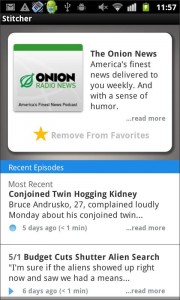
Stitcher SmartRadio
Features
Show of hands….who’s heard of Pandora? I’m guessing a better question is who hasn’t heard of Pandora!
Well here’s the thing. Stitcher SmartRadio works a lot like Pandora, it just works with full radio shows rather than specific artists or song titles. The idea is that you, as the user, search through the available content and then “stitch” together your very own radio station. Meaning that one show would follow another until you have created the exact mix of content that you are looking for.
My favorite feature here would be discovery. If I take the time to add all of my favorite stations to Stitcher SmartRadio then the Android app will make suggestions as to other content I might enjoy. As I haven’t had the time to sample every radio show that Stitcher SmartRadio has to offer, I am happy to take their suggestions and hope that my new favorite show is just waiting on me to find it.
Least favorite feature? Music stations are not included in the Stitcher SmartRadio search options. I know, I know the point isn’t to search music. But the point IS to search radio shows. My favorite radio show happens to be a morning show that used to syndicate in our area. I would love to be able to listen to it again now that our local station has picked up another morning option. But, no music stations means no Ace & TJ for me! Boo!

Stitcher SmartRadio
Functionality
Functionality is a bit of a gray area for Stitcher SmartRadio. The app worked well on my Android, it just didn’t work all that great. Solid middle of the road here.
What I mean by that is there were times when Stitcher SmartRadio worked great. It would open smoothly and play everything I wanted from beginning to end. And then there were other times when I couldn’t get app to work at all. It would force close, lose content or make me start over from the beginning building my station. Not really what I like to see!
Now, I will say that these are issues that can be fixed and may be gone a few updates from now. Only time will tell.
My other issue with the Stitcher SmartRadio Android app is that it comes packed with a HUGE list of permissions. Literally there are too many for me to even begin to list. If I am being completely honest, this is an Android app that will not stay on my device simply due to the overwhelming number of permissions it comes with. IF they cut down on that list, then I might be willing to give Stitcher SmartRadio another try.
Usability
When talking about usability you want to look at how the Android app will fit into your everyday life. Is it something that will make life easier or bring you joy? OR! Is it an app that brings you nothing but a headache? What we have to decide is does Stitcher SmartRadio fit into the first category or the second.
For me…the second.
Here’s why. Remember how we talked about functionality and how sometimes the app would work great and sometimes it wouldn’t work at all? That’s pretty much the issue. Also, if you stop a show in the middle, then there is no way for you to bookmark your spot. You have to remember where you were at and then try to come back in to finish things out. And I got really tired of rebuilding my station.
Like I said, a few updates down the road this might be an amazing Android app that I will love. They just aren’t quite there yet.
Stitcher SmartRadio
Android Apps Review Details: Stitcher SmartRadio Android App is free. This app requires Android 2.0 and up. You may download Stitcher SmartRadio from the Android Market.
This Android app review, as well as the other Android app reviews for droid phones and droid tablets on this site, are brought to you by AndroidAppsReview.com.











