


Written Android App Review
One of the biggest features to Android devices as a whole can also be viewed as a huge draw back to some users. What could it be? Well, none other than all the different screens that you can use to paste widgets or other shortcuts. What happens, especially to new users, is that you lose track of where your widgets are and spend most of your time looking for your icons as you scroll through screen after screen.
Plus, it can get beyond frustrating to have to wind your way through the settings menu each time you want to make a slight change or tweak to your Android!
Enter Quicker Android app! Quicker takes all the features you are forever searching for and organizes them into one easy to use menu. A menu you can customize and one that you have full access to at the touch of a button! Sound good? Yes, I think that it does, but read my Android app review to decide for yourself.
Quicker
Features
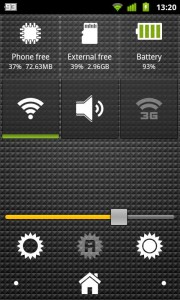
Here’s how it works. Quicker gives you a menu. One that is straightforward and one that you can customize to your hearts content. You can add shortcuts for flashlights, battery indicator bar, ringer mode, airplane mode, auto sync, Wi-Fi and bluetooth just to name a few. Then, once you have everything set up, you just pull up the menu and you have exactly what you are looking for ready and waiting for you!
What do I love? Well for starters I love being able to pick and choose the shortcuts that I want set up. Honestly that is the most attractive feature to me as I hate being forced into menus laid out by what someone else deems important.
But what I don’t love is that the Quicker Android app is limited to portrait mode. Meaning that you can’t switch to landscape and the menu will not rotate with your phone. I’ll admit that this bugs me. It bugs me because landscape mode is often easier to use and I generally like it better.
Functionality
Functionality was great for the Quicker Android app! It did not force close a single time, did not freeze and did not seem to drain my battery! This is exactly what I like to see and it goes a long way towards making me more and more impressed with the Quicker Android app.
The downside here is that the permissions list is long and inclusive. I’m thinking that the reason for this is that in order to operate all of the available menu functions, the Android app has to have permission to use these functions, but it still makes me slightly nervous.
Quicker
Value
In terms of value I just don’t think that you could ask for more from Quicker. At a $1.41, the Android app is reasonably priced and it offers a huge amount of content for what is practically pennies. However, if you are one of those people who like to try before you buy then there is a free version. So give it a shot. Either way with the free version on board you can take it for a test drive before you ever part with a single cent! It’s a win/win all the way around!
Quicker
Android Apps Review Details: The Quicker Android app cost $1.41. This app requires Android 2.1 and up. You may download Quicker from the Android Market.
This Android app review, as well as the other Android app reviews for droid phones and droid tablets on this site, are brought to you by AndroidAppsReview.com.











