



Written Android App Review
Yes, there are a plethora of Android apps. A while back I had the opportunity to review an amazing little Android app known as My Coffee Card Pro. The point of My Coffee Card Pro is that it works as a Starbucks app for your Android device. One that allows you to store your rewards card, keep track of your rewards points and even gives you the ability to reload and store multiple gift cards.
In short, the Android app worked great and I loved it! But it is NOT the official Starbucks Android app and I didn’t feel that it was right to fully endorse the competitor without giving the home team a fighting chance. So today we are going to do just that and take a look at the official Starbucks Android app. It’s an app that makes big claims, and its going to have to live up to those claims if it wants to take My Coffee Card Pro down a notch or two.
Let’s see if Starbucks is up to the challenge!
Starbucks
Features
The Starbucks Android app is designed to work as a sort of mobile gift card that is always stored on your Android device. This card allows you to pay for your Starbucks order, check your reward card balance and even keep track of points. You can also add cash to your card at any time.
What do I love? I love the bar code that pops up at the touch of a button. When I gave this a shot at my local Starbucks, it worked great and let me pay for my tea with nothing more than a quick scan. I also love that my card balance is always displayed to help me keep track of the total.
I don’t love that the reload feature does not seem to work. It allowed me to enter my card info, but when I tried to add cash to my Starbucks card it was a no go. I tried twice and just ended up with an error message both times, which made me nervous to try a third time. When things like that happen you never know if they just aren’t going through or if you are going to suddenly end up with all three charges on your account!
Functionality
Functionality was spotty to say the least. While I could get it to work sometimes, the
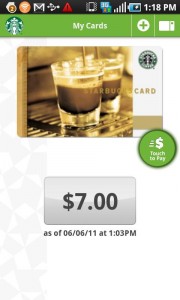
Starbucks
Starbucks Android app force closed more often than not. And then sometimes it would just lock up. Not to mention the issues I had with reloading my card which we have already covered!
Starbucks did create a bright spot for themselves when it comes to permissions. The list is short and every entry makes sense. A small bright spot I’ll admit, but a bright spot none the less.
The Verdict
The verdict? Go with My Coffee Card Pro. It does have a small price tag attached, but its a better overall Android app and…It actually works! In fact, I’m not really sure why Starbucks doesn’t just adopt this app as their own and scrap the poor showing they have managed to come up with. To be honest I expected more and I’m pretty upset that I didn’t get it!
Starbucks
Android Apps Review Details: The Starbucks app is free. This app requires Android 2.1 and up. You may download Starbucks from the Android Market.
This Android app review, as well as the other Android app reviews for droid phones and droid tablets on this site, are brought to you by AndroidAppsReview.com.











