

Written Android App Review
It hasn’t been that long since any decent outing called for your cell phone, digital camera, maybe an MP3 player and on some occasions a GPS or even video camera. Talk about some full pockets! Now the one stop shop that we all know as our beloved Androids have taken all these gadgets and packed them into a single easy to use device.
And to make your Android work to the best of its ability, its all about the apps! Finding the best Android apps is the difference between having a device that barely seems to work and one that can practically walk and talk.
Today we are going to look at an Android app that wants to take your run of the mill MP3 player and amp it up a notch or seven. I’m talking about the one and only Cloudskipper and let me tell you that this is one Android app that has been getting some big time attention. More than just another MP3 player, the guys at Cloudskipper are doing some exciting things and I think that you just might want to take a look.

Cloudskipper
Features
There is a lot to love about the Cloudskipper Android app. First off, the app works and it works very very well. But that is just the beginning.
The developers are Cloudskipper are determined to make their app the hands down best option out there for Android MP3…and they are willing to put their time where their mouth is. Have a problem? Just let them know! They will instantly get to work on a bug fix and may have something out to you in a matter of hours.
How’s that for customer service?!?! Guys this is a brand new Android app….just launched and still in the tweaking stage. If it is this great now I can only imagine what things will look like in a few short months. Oh…and when you check out this app in the Android market? Make sure that you take notice of all the great features that are “coming soon.” Some aren’t even named, but with all that Cloudskipper has to offer I am quite curious as to what these mystery features may be.
But Cloudskipper takes things one step further with the fact that this Android app is 100% ad free. Meaning no interruptions, no unsightly banners and no barrier between you and you tunes.
What do I love? I love that I can share my tunes directly through either Facebook or Twitter. I can also target certain friends with certain songs. The process is easy, it gets right to the point and it works! What’s not to like about that?
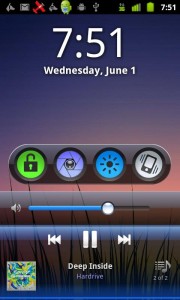
Cloudskipper
Functionality
Well, I guess congratulations are in order. You see, Cloudskipper has set a new record for my Android app reviews, its just not a record that I would want to hold! What title did they claim? Well, at 23 they officially have more permissions than any other Android app I have ever reviewed. I’m not sure whether to laugh or cry at that one!
Seriously….is all of that really necessary? Is it necessary for Cloudskipper to Act as an Account Manager? Or Read Sensitive Log Data? Or even Discover Known Accounts? Any of these points may not mean much on their own, but when you string them all together, permission after permission after permission, then you definitely have something to be wary of.
On the flip side the Cloudskipper Android app had zero functionality issues during my review. It worked well each time I pulled it up, did not freeze and did not forced close. I guess there has to be a silver lining somewhere out there!
Beat Worthy
My friends…I’m torn. I’m torn and I’m not afraid to throw it out there. This is a great Android app. In fact, I have really enjoyed my time with Cloudskipper. The only problem is that I am having an extremely hard time coming to terms with that permissions list. For some of you that may not even blip on your radar and if so then you definitley need to give Cloudskipper a second and even third look. But for the rest of us…well let’s just hope that they take the hint and tone things down a bit after an update or two.
Cloudskipper
Android Apps Review Details: The Cloudskipper Android app is free. This app requires Android 2.1 and up. You may download Cloudskipper from the Android Market.
This Android app review, as well as the other Android app reviews for droid phones and droid tablets on this site, are brought to you by AndroidAppsReview.com.








Hi Mr Woods 🙂
Thanks for the review. We appreciate the nice words.
As to your concerns about permissions, we completely understand. You’re right to be concerned and we’re working on explaining why we need these better.
Our philosophy is if we have a feature that is the pipeline we ask for the permission now instead of later. The reason we do this is because the Android Market makes you manually update an application when it adds a permission. The permissions you mentioned are necessary for features we have in development. As you can tell we have a lot in development so that requites a lot of permissions. I’ll address the one’s you mentioned:
- Account Manager - We don’t use this now, but it will be integral to our wireless syncing software we’ll be releasing later in the year. You will use your google account to authenticate.
- Log Data - We use this so we can debug exceptions that are reported. If you uncheck “Send Crash Reports” we won’t capture or send any log information.
- Discover Known Accounts - We use this to automatically fill in your twitter account when you sign in. Unfortunately, Twitter recently broke this feature, but we’re working on fixing it. This permission will also be used in the syncing software.
We’re working on a blog post to explain how we use permissions much better. We’ve just been swamped after Google decided to feature us… 40x growth in 3 weeks 🙂
Like you said, we want to be the best media player on the market, and we take feedback very seriously. Thanks for the review.
mc