



Written Android App Review
Cloud-based sync has definitely made some strides the past year, going from a well loved techie favorite to a household name. This growing trend fuels companies such as SugarSync. This backup, sync and share company recently performed an important update to their Android app.
Want to know if this service holds a candle to Dropbox? Read on. Our Android app review of SugarSync reveals all.
Features
SugarSync
Like other cloud services, the SugarSync Android app allows you to share documents, photos and other files between your desktop, laptop and Android with ease. Sync services are awesome for business, travelers or people who want their data to be available everywhere without a lot of hassle.
I’ll admit it now and get it out of the way. I’m a Dropbox fan, and have been for some time. But a couple key features of the SugarSync service (including the recent updates) are pretty sweet.
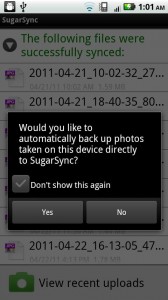
The main improvement was the addition of Mobile Device Management, a system that allows you to manage SugarSync content right from the app, instead of simply linking you to outside content. That means you can transfer files and entire folders to the Web or other locals with a couple clicks.
I’m also in love with the 5 GB of free storage that comes with SugarSync, which, frankly, puts Dropbox’s free 2 GB limit to shame.
There are a few pesky limitations in the actual service itself (like the 25 MB shared file limit), but SugarSync’s Android app is easy to use and navigate. I hope the app’s text editor feature (currently available on the iOS version) finds its way to Android soon, then I might even consider jumping ship.
Layout & Design
SugarSync
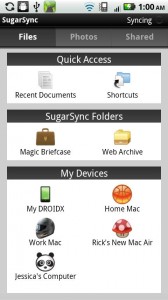
Quick links to recent documents, shortcuts and an easy set of top tabs make using the SugarSync Android app quite pleasant. I’m in love with the Quick Access panel, but the folders section and direct access to your Android’s file library are easy to navigate as well.
The photos tab utilizes thumbnails to keep it festive and make finding the file you’re interested in easier. There’s also an entire tab for shared folders, making collaborative projects come alive on the go.
It’s a pretty basic UI, but that’s necessary to facilitate clear file transfers. I dig it.
Functionality
The only functionality issues I ran into with the SugarSync Android app actually involved the SugarSync website. Uploading files, moving them between folders, creating an online photo library and every other mobile test I tried worked quite well. Mobile Device Management is seriously user friendly.
The SugarSync Android app certainly has its stuff together. There’s no buzz yet about security issues, although I assume they’re there. But it’s nice to Google your file sync service and not see a bunch of bad press.
Value
The SugarSync Android app, and the basic SugarSync cloud service, are free. Download and enjoy a Dropbox alternative. If you’re new to the cloud or just looking for something a little different, with more customization options on the go, give SugarSync a try.
SugarSync
Android Apps Review Details: SugarSync Android app is free. This app requires Android 1.5 and up. You may download SugarSync from the Android Market.
This Android app review, as well as the other Android app reviews for droid phones and droid tablets on this site, are brought to you by AndroidAppsReview.com.








Hi, what a great web blog. I usually spend hours on the net reading blogs on various subjects. And, I really would like to praise you for writing such a fabulous article. I honestly believe there is a skill to writing articles that only very few posses and yes you got it. This is really informative and I will for sure refer my friends the same. Thanks.