



Written Android App Review
Memory card mogul SanDisk has forayed into the app business with a stellar new memory management. The SanDisk Memory Zone Android app takes the idea of removable storage one step further with cloud support and a whole lot more.
Features
Reviewed by Valerie Lauer
During our Android app review it became quite clear that SanDisk Memory Zone is designed to do the job of several other individual apps, positioning itself as a one-stop resource for users who want to manage their files.
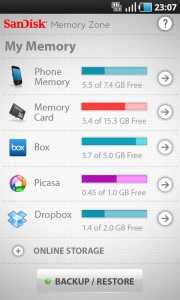
The app gives you instant access to all music, photos, videos, documents and apps stored on your Android and on your memory card. It also allows you to manage and move files to and from Dropbox, Google Docs, SugarSync, Box and Picasa.
Worried about privacy? Don’t be. SanDisk Memory Zone allows you to password protect any type of document with the touch of a finger.
A handy backup feature allows you to save files and contacts to certain services. To restore simply access the backup menu and choose the file to restore.
DropBox Memory Zone earns top marks for its impressive suite of file management tools, security settings and easy access to cloud-based content.
A filter option would be a nice addition to the app. We didn’t really need to see all the default sound files stored on our Android mixed in with other music files. Otherwise it’s hard to complain about this app. It rocks.
Layout & Design
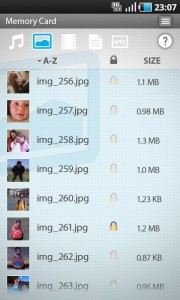
SanDisk Memory Zone
An intuitive design makes managing files easy. Touch the memory source you want to access, then swipe left and right through the file types to view content by category. A single touch will launch the file in your Android’s default program (or launch the app if you tap an app). A long hold launches move, upload, delete and make private options.
Dedicated help buttons on each page make navigating easy, even if you get a little confused. Additional settings can be accessed by tapping your Android’s menu key.
Functionality
While navigating the app is easy enough, you may experience some delay depending on the type and size of the file you are trying to access. This will depend partially on your processor (if you are accessing a file on the phone) and the speed of your data connection (if you are accessing files from the cloud).
Even on an Android with a fast processor the wait was a little frustrating. And if you are backing up a large amount of files the wait could be even longer. We suggest running backups in the background to minimize frustration.
Value
Like most memory management apps, SanDisk Memory Zone is completely free. All you have to do is deal with a couple SanDisk advertisements and the occasional sales link to update your existing memory card. And, let’s be honest, if you were going to upgrade your memory you would probably purchase a SanDisk any way.
SanDisk Memory Zone
Android Apps Review Details: SanDisk Memory Zone Android app is free. This app requires Android 2.2 and up. You may download SanDisk Memory Zone from the Android Market.
This Android app review, as well as the other Android app reviews for droid phones and droid tablets on this site, are brought to you by AndroidAppsReview.com.








