


Written Android App Review
Over at that other operating system the latest release included a new voice search feature known as Siri. Here in Android land, it took one crack group of developers eight hours to build Iris, in true hackathon style. Iris is an Android app with conversational voice search abilities that mirrors Apple’s Siri program, in more ways than one.
Concept & Execution
Reviewed by Valerie Lauer
To be fair, Iris is not exactly like Siri. Siri is more of a personal assistant, dedicated to circumventing Google for search results. While Iris uses Android’s built in voice search then trolls Wikipedia to answer basic questions about history, science, literature and a wide range of topics.
The amazing thing is that Iris was built in just eight hours. There’s no official word on how long Siri took to build, but it’s pretty safe to say it took longer than that.
An interesting set of quirky conversational replies have recently been added to the Iris app as it went alpha. That means if you have a question, or if you just want to chat, the Iris Android app can comply.
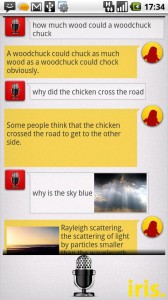
Iris also replies with photos of the topic you are discussing. Tap a result or pic to access the relevant Wiki page the information came from.
That’s it for Iris right now. She’s a bit plain. However the opportunity for future improvements is endless, and many users, myself included, will probably hang on to the Iris Android app while they roll out.
Layout & Design
Iris
The Iris Android app is also simply designed. A simple tap launches your Android speech recognition feature. Questions and answers are then displayed in a chat-style conversation. I do not know if Iris has a max amount of space for this, but your history can be cleared by touching and holding the mic icon.
A little customization would go a long way here. But we have to remember, Iris is in its fledgling state.
Functionality
There are two main frustrations with the Iris Android app. One is the app’s complete dependence on Google’s voice recognition software. About one third of the phrases I said to Iris were interpreted incorrectly, even when I tried to speak carefully. There is no option to type in a question or edit an incorrect result.
The other big frustration is Iris’ relatively small base of information. There just hasn’t been enough time to program all the answers into this app yet. So if you can get the correct question into the app, there’s a chance Iris might not know the answer.
Also, search results take a bit long to appear. So Iris could definitely use a code facelift.
Value
A free app that does something new and interesting, it’s definitely worth giving Iris a once over. The app’s incredible speed of development, wide range of possible future updates, and the chance to thumb your nose at Apple by using an app that so closely resembles theirs, are all great reasons to install Iris on your Android.

Iris
Android Apps Review Details: Iris Android app is free. This app requires Android 2.1 and up. You may download Iris from the Android Market.
This Android app review, as well as the other Android app reviews for droid phones and droid tablets on this site, are brought to you by AndroidAppsReview.com.











