Written Android App Review
The new Weddar Android app gives a whole new face to weather reports: your’s. If you’re tired of being told there’s a 30 percent chance of rain by a stooge in a suit who’s 1,000 miles away, you’ll love our Android app review of Weddar.
Online masters degree programs are a resource for learning the tech skills to design cool apps like this.
Features
Reviewed by Valerie Lauer
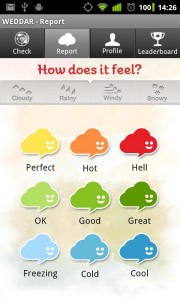
Weddar is weather reporting by the people for the people. Simply open the app and tap report. Choose the current condition from the brightly colored clouds, add a precipitation indicator if need be, and poof! You’re a meteorologist!
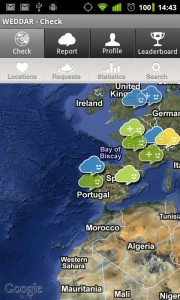
There’s also an interactive map function that lets you view other users’ weather reports. The same multi colored clouds you used to report the weather will let you know instantly what conditions are like anywhere there’s been a weather report.
It’s pretty cool. You can even save other weather reporters so you can easily access their updates, upload a cool user image, view report stats for your location and do an in-app search.
If you are really dedicated you may even find yourself on the Weddar leader board, where the top 50 weather reporters bask in the adoring glow of their public.
Weddar is a simple way to get the skinny on outside conditions, without having to wait through half an hour of bad local news coverage or 15 minutes of world weather news on The Weather Channel. It’s also darn cute, and an interesting idea.
The power of the Weddar Android app is in the hands of its users. The more reports for any area, the more accurate and up to date the weather news will be.
Layout & Design
Weddar
A streamlined top tab design makes accessing Weddar’s map, reporting weather and viewing your favorite weather reporters quite simple.
Each page has accurate touch response. It’s particularly easy to report the weather, as we mentioned earlier.
A streamlined design puts the weather at the foreground, and those adorable weather clouds making telling conditions as easy as glancing at the screen. Top marks for a solid design.
Functionality
Technically, the Weddar app works quite well. The map is super responsive to pinch and zoom navigation. Each button and tab functions perfectly.
We did experience a brief issue with the app’s map. After a bit of heavy duty zooming and scrolling, all the weather reports disappeared from the screen. A simple app exit and reload fixed the problem, so it wasn’t serious.
Also, the app takes a moment to load each page’s information, even when you’re using a fast connection to load content.
Value
How can you resist Weddar? The app is fun, interesting and indulges my inner longing to be the Goddess of Thunder. Oh, and it’s free. So feel free to reign supreme and own your local weather with the Weddar Android app. It’s a lot of fun and you have nothing to lose.
Weddar
Android Apps Review Details: Weddar app is free. This app requires Android 1.6 and up. You may download Weddar from the Android Market.
This Android app review, as well as the other Android app reviews for droid phones and droid tablets on this site, are brought to you by AndroidAppsReview.com.