


iSync: Written Android App Review
The Internet is a big place—we aren’t kidding, it’s seriously a massive area where almost anything can be found, followed, or re-blogged. If you’re at all like us, you have about fifteen different accounts with various social networking and media sites. The daily challenge of aggregating all these sources into a comprehensive, and easy-to-read format can be quite difficult. Thankfully, there’s iSync (Avalaa) to help us out on our Android devices. For our full thoughts on this Web ready application, check below beyond the break!
Concept and Functionality
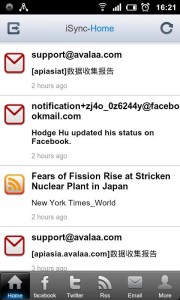
iSync for Android
iSync is like that one friend that’s always inviting you to trendy events: It gets together the whole gang, and then serves as the glue that ties it all together. What we mean is, the app trolls through several different social networking venus, including Facebook, Twitter, and your Email, and then reorganizes all of the data it finds into one convenient home screen. In the same way that you can troll through your Twitter feed with the flick of a button, so can you seamlessly view all of your content from each of these locations with iSync. However, the app doesn’t just stop there, but also adds RSS support, allowing you to track just about anything that’s Atomic enabled. We very greatly appreciate the functionality, especially considering the sheer ubiquity of RSS services.
Even better, you can even perform a few basic networking functions from the app itself. This includes adding comments and re-sharing content directly from your Android device. Not only is this convenient, but it adds heaps of value to iSync, which would otherwise be a read-only affair.
Design and Layout
Perhaps the biggest boon in iSync’s favor is its one-of-a-kind design. The layout of the application simultaneously harks to the services it supports while establishing a unique look of its own. iSync makes extensive use of tabbed navigation controls, stored along the bottom of the design. We appreciated this immensely, as it keeps each individual service only a click away, as well as the aggregated home screen. On the subject of the home screen, we greatly enjoyed how easily it combines all of our favorite content. Obviously this is the main idea at the core of the title, but it really does just work, saving us heaps of time in Web browsing. Best of all, it’s hardly a pain at all to add comments or share content. At the end of the day, we couldn’t be happier with the apps’ packaging.
Overall Value
Best of all, iSync is completely free in the Android Market. This means you can enjoy all of your favorite Web media aggregated in one central location without spending a dime. There aren’t even any adverts in place to distract you from your viewing pleasure. That means iSync earns a full four stars from us, as well as a hearty recommendation for its ease-of-use.
 Android Apps Review Details: iSync app is free. This app requires Android 2.1 and up. You may download iSync from the Android Market. A small expedite fee was paid by the developer to speed up the publication of this review.
This Android app review, as well as the other Android app reviews for droid phones and droid tablets on this site, are brought to you by AndroidAppsReview.com.











