


Price : $0.99
Alarm Clock: Written and Video Android App Review
No matter how you slice it, setting your life to an alarm simply sucks: Whether it’s waking up in the morning, or remembering to go to work in the afternoon. If you’re life is run by the alarm on your phone, we might have a way out of your own misery to offer you. It’s called Alarm Clock, and it’s developed by Jais Joy. The app allows you to create cool, customized ringtones to wake up to, allowing your day to start with a little more dignity, and depending on what you create, even a smile on your face. If that sounds like something worth pursuing, then head on down below the break to view our whole thoughts on this killer app for Android!
Concept and Functionality
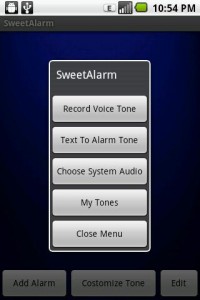
Alarm Clock for Android
In the strictest sense of the word, Alarm Clock is exactly what the name suggest it is: It’s an app that allows you to set alarms, as well as tones that fire when the time is reached, to wake you up, get you to work, or do just about anything else that requires a reminder. However, the app adds a few interesting perks that make it infinitely more worthwhile than some of the other, blander apps we’ve taken a look at in the past.
Firstly, the app allows you to create several different timers to work with. All of these can be edited whenever you feel like it using the simple interface. Also, each reminder can be customized with a set tone. This tone can come from within the app, or you can create it yourself using your voice and the recorder. The app will also allow you to create text-to-speech tones using a variety of voices. It’s really quite brilliant, as you can quickly create tones that match the nature of the ringer. To see this in action, check out our video review of the app.
Design and Interface
Sadly, though, Alarm Clock is just not the prettiest application that we have ever seen on an Android device. The interface behaves well-enough, and we had no problems getting at the features that we needed. That being said, it’s still rather rough around the edges, and the user experience is simply not as smooth as we might have liked it to be. For example, editing controls more in line with iOS (slide to delete, quick rearranging in lists, etc.) would have been greatly appreciated. However, future updates could easily add this functionality.
Overall Value
At the end of the day, though, Alarm Clock is easily worth the dollar it costs for the text-to-speech function alone. If you’re looking for a simple way to create cool tones to use in your alarms, Alarm Clock is by and far the app you should consider. It’s cheap, effective, and hopefully with a few updates, it’ll be the best reminder app on the Android Market.
 Android Apps Review Details: Alarm Clock is $0.99. This app requires Android 2.2.+ and up. You may download Alarm Clock from the Android Market. A small expedite fee was paid by the developer to speed up the publication of this review.
Android App Review, Android Productivity App Review,
This Android app review, as well as the other Android app reviews for droid phones and droid tablets on this site, are brought to you by AndroidAppsReview.com.









thanks for the post.. i was waiting for this a long time.. the features are amazing of the clock.. but i think the price of this is quite high..
Thanks for appreciation. In my understanding $1 ( $0.99 ) is the lowest price in Google play store practice.
Now this app is on offer
First 100 downloads will get the refund.
Also if you do rating ( even if 1 * ) , we would refund the money as a thanks giving for feedback.
Currently this app is called “Sweet Alarm - Sweetness 2 Life”