Price: Free

Truecaller: Android Apps Written Review
Features
As with its appearance on other systems like iOS, Truecaller shines with its simple, yet elegant set of features. Users can quickly search for others through the online phone book, view and edit security settings, block spam numbers, and take part in the integrated social media features. The app has over 700 million names with numbers, thanks to the collaborative approach taken by the developers for adding in new contact info via users. Truecaller allows you to place certain numbers on blocked list, tag numbers as ‘spam’, and even view a list of most-commonly spam tagged numbers. Each individual in Truecaller has a True points number and a Spam points number. The True number points to the number of connections this individual has in Truecaller (popularity status anyone?) There is also options to sync your device directory with either the global directory or the Facebook directory. Furthermore, you can view and edit your own listing, once you have verified your own phone number through Truecaller. Finally, Truecaller lives up to its description as a ‘collaborative phone directory’ through its People section, where you can see people you may know through your contacts connections. Thus, the real power of Truecaller is fully realized when you have many of your friends uploading contacts through it as well.
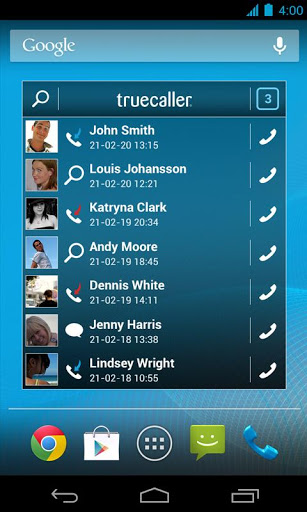
Truecaller Android Apps Review
Appearance and Layout
Following in step with the well-designed features of Truecaller is the excellent graphical layout and interface. It’s remarkable easy to setup the service from the start, then start browsing and searching for numbers. Select numbers, viewing more info, or blocking reported Spam numbers is also very easy, with just a few onscreen taps of the buttons. The developers also offer support via a swell website, available here.
Value
Truecaller is an impressive app, both in terms of features and interface. It’s had to beat the excellent price (free!) and wonderful developer support as well. Please check out Truecaller today to see for yourself how handy this online phonebook app can be. Also, keep in mind that the team behind Truecaller has pushed this app on several platforms, not just Android. It’s also available for iOS and Windows phones!
 Android Apps Review Details: Truecaller is free. This app’s Android requirement requires 2.2 and up. You may download Truecaller from the Android Market. A small expedite fee was paid by the developer to speed up the publication of this review, as well as a video production fee.
The AndroidAppsReview rating:
“The best Android apps are reviewed by AndroidAppsReview.com“