Price: Free (lite)


Image Shrink Lite (Resizer): Android Apps Written Review
Image Shrink Lite is a very popular image resizer app for Android. Available from Google Play from developer AnOliveTree, this app is for free as a lite version, with a full (pro) version available for just $1.99.
Features
As one of the most popular image editing apps on Android, Image Shrink Lite almost doesn’t need an introduction. It’s been consistently praised for its simple, yet powerful approach to resizing photos on Android. For the uninitiated, Image Shrink Lite lets you resize your gallery images on your Android phone or tablet. You can then export and share them as needed, with a large number of export/share options (bluetooth, Dropbox, etc). Here’s the nitty-gritty details for those more tech-minded: Image Shrink Lite will resize the images, but keep the original saved as well. Custom sizes are allowed to be set, although these are restricted on the Lite version. You can choose to keep or strip the GPS data as well as the date/time. Finally, you can also choose the actual image quality you want the resized file to have (and thus the amount of space it will likely take up). Exif tags and auto rotation based on such are included in this.
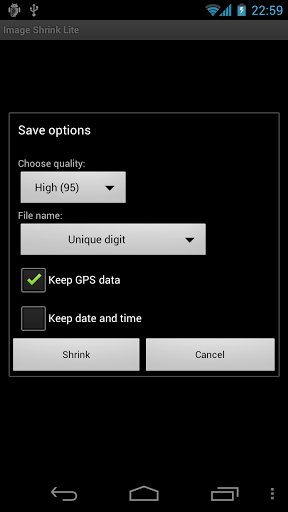
Image Shrink Lite Android Apps Review
Appearance and Layout
Don’t expect too many bells and whistles in Image Shrink Lite. Don’t get me wrong-it is a very functional app and one that is awesome for resizing. However, it is not the sharpest-looking app. It’s definitely on the plain side. However, for users willing to overlook this, they will find a very powerful resizer for free on Android. Furthermore, the actual layout isn’t too complicated to figure out, which is often more important than having showy graphics or flash menu options.
Value
Having to resize a photo on your Android tablet or phone is often a very frustrating process. The default photo and gallery options usually just don’t cut it. Fortunately, there is an app for that-Image Shrink Lite. It does the job very well and the free version isn’t too restricted. If you want the ability to batch resize images or explore all the resize sizes, then go ahead and buy the full version ($1.99). Either way, please try out this app if you take photos or use any other image features on Android!
 Android Apps Review Details: Image Shrink Lite is free. This app’s Android requirement requires 1.5 and up. A small expedite fee was paid to speed up the publication of this review.
You may download Image Shrink Lite from the Android Market.
“The best Android apps are reviewed by AndroidAppsReview.com“