Price: Free
Rating: 

Photo Button (Spy Camera): Written Android App Review
Here at the Android Apps Review, because we have the opportunity to write for the most open-minded mobile platform, we have the unique opportunity to review “tweak” applications that don’t offer entertainment so much as they offer a great way to improve your productivity. With that in mind, we’re happy to present you today with an app called Photo Button. It’s a free app that allows you to rapidly snap photos using nothing but your phone’s volume buttons: A common jailbreak feature on the iPhone, and a useful one here. For our full review of the app, you need only to slide on down below the break!
Concept and Functionality
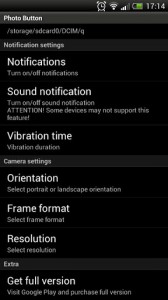
Photo Button for Android
As mentioned already, the core concept behind Photo Button is relatively easy to get an angle on: The app serves as a background utility that allows you to double press on your volume buttons. In return, the application activates the device’s camera, snaps a photo, and then saves the end results to a folder you specify. It’s quick and gets the job done in a pinch.
If you’re not sold on this as a useful concept, think about it this way: How often have you rapidly pulled your phone out of your pocket in order to take a picture, only to miss the moment because of the clunky menus and options? With Photo Button, you’ll never have to experience this again.
Best of all, the app also adds a few notable additions to the mix. For instance, you can specify whether or not you want landscape or portrait mode for the photos. You can also setup the flash settings, as well as the autofocus so that your photos are exactly as you want them. It’ll even give you haptic feedback and notifications to let you know that everything went peachy keen. All in all, it’s neat stuff, and don’t let anyone tell you otherwise.
Design and Implementation
Now, we’ve heard from other users and reviews that the application doesn’t yet work on all devices. With that in mind, we had no problem getting Photo Button setup and jamming on our own Android phone. It worked in a pinch, and was actually quite useful.
As far as design goes, the app is as simple as you might expect, largely consisting of a single Android-styled menu. Then again, it also comes with a neatly tidy widget to turn the app on or off. It’s these small touches, plus the customization, that still make this a fantastic outing, though a minimalistic one.
Overall Value
If you’re concerned about the phone working on your device, look at it this way: Photo Button is completely free, making it hardly a risk to have a go at. Go ahead and download the app if the functionality sounds worth looking into. At the least, it’ll leave you wanting. At the most, it’ll satisfy you for years to come.
 Android Apps Review Details: Photo Button is FREE. This app requires Android 2.2 and up. A small expedite fee was paid to speed up the publication of this review.
You may download Photo Button.
“The best Android apps are reviewed by AndroidAppsReview.com“