Price: Free
Rating: 
truBackup (Mobile Backup)
Android App Review by AndroidAppsReview.com
Concept and Functionality
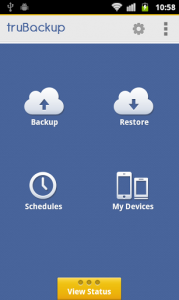
truBackup for Android
As stated before, the idea behind truBackup is quite simple, though no less effective for it. The app allows you to select certain bits of your phone—your contacts, photos, SMS, videos, and applications—then back it all up to either your SD card or your DropBox account. If you’re looking for total security, and use DropBox as much as we do, having the cloud at hand is a marvelous decision on the developers’ parts.
Either way, the end results are satisfactory beyond belief. Backups take very little time indeed, and are background capable. This means you can schedule them incrementally or on a clock, then just let them rollin the background while you head back to Facebook. When you need to restore—potentially because your engine has borked itself, Captain—just head back to truBackup and select the items you want to restore. The app does the rest for you, and in seconds, you’ll have all of your old stuff back up and running. Good as new!
Design and Interface
Even better, the application happens to look quite smashing, too! It’s got a pleasant web-app inspired appeal to it that puts all the important bits right where you need them in a structured icon layout. Just tap to complete the actions you want, so long as you’ve added your necessary settings. Want to change those, too? Just click the gear icon in the top right. Hand over foot, this is an incredibly good looking app. Even the small touches—like the option to support multiple devices and make separate restores—are marvelous. All in all, we can’t laud the chaps any more than we already have for making truBackup very easy on the fingers and eyes.
Overall Value
And while the app is still free, and comes with a limited time upgrade to professional grade services due to launch, it’s a phenomenal bargain. Even once it’s for-pay, though, you’ll hardly be put off to spend a bit of pocket change on the app. It’s highly worth your time to have a look at, especially if you have a habit of breaking or otherwise messing up your phone. It’s got everything you need, and it couldn’t be simpler to navigate. And who could ask for more than that, really?
 Android Apps Review Details: truBackup is FREE. This app requires Android 2.3 and up. A small expedite fee was paid to speed up the publication of this review.
You may download truBackup (Mobile Backup).
“The best Android apps are reviewed by AndroidAppsReview.com“