Price: Free
Rating: 
Active Lockscreen
Android App Review by AndroidAppsReview.com
We’ve said it before, but we think it bears repeating here, as well: One of the coolest things about Android is the sheer amount of control it gives its users. Nowhere is this more apparent than with the lock screen. Not sure what we’re talking about? Then you might want to give Active Lockscreen, from Celltick, a shot. The app allows you to turn that boring old startup screen into a place of wonder and magic, easily directing you to all of the important areas on your phone. Best of all, as a free app in the Google Play Store, it’s a phenomenal value. For our full review of this tidy application, you need only to slide on down below the break!
Concept and Functionality
The core idea behind Active Lockscreen looks, acts and feels a lot like the HTC home screen. If you have one of those phones, then all of this is about to make a whole lot of sense to you. For those that don’t, here’s the breakdown: The screen begins with a tap of a power button. From there, you can drag a ring at the bottom toward other objects on the screen. Releasing the ring on top a sprite will go to the action associated with that object. That’s how the HTC screen works.
Active Lockscreen takes that concept and then pumps it up to gigantic proportions. Dragging the ring over an email icon, for instance, doesn’t take you to just any specific mail app: Instead, it presents you with all of the configured mail apps available. Drag a bit further, and you’ll arrive directly where you need to be. You can do this for messaging, browsing, calling (including your missed alls and call logs, which is awesome) and anything else you like—so long as it’s somewhere on your phone!
Design and Customization
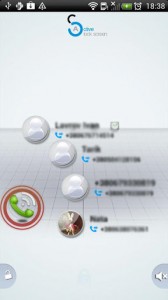
Active Lockscreen for Android
Perhaps one of the coolest things about the app is the fact that it does give you so much control. You’re free to rearrange, delete, or otherwise mangle those icons on the lockscreen until you feel comfortable. Furthermore, you’ll get an entire bevy of themes to choose from, all of them really quite stunning. All in all, this means that we have no doubts each user can setup, theme and live with Active Lockscreen quite comfortably on their Android phone: More than likely with a sharp increase in productivity, too!
Overall Value
At the end of the day, Active Lockscreen is a tremendous value, clocking in at the Free Finish Line in the Google Play Store. It won’t cost you a dime to use, may potentially boost your productivity, and comes with a heck of a lot of good reasons to give it a go. If none of that sounds appealing to you, then pass on by. But if it carries even a mild interest, go for it! We promise you’ll love your lockscreen on steroids.
 Android Apps Review Details: Active Lockscreen is FREE. This app requires Android 2.3 and up. A small expedite fee was paid to speed up the publication of this review.
You may download Active Lockscreen
“The best Android apps are reviewed by AndroidAppsReview.com“