Price: Free
Rating: 


Air Call Answer
Android App Review by AndroidAppsReview.com
There’s a genre of applications that we see a lot more of over in the Android camp than we do in the iPhone world. Simply put, these are apps that allow us to tweak, modify or otherwise create a new experience for ourselves on our phones. Today’s entry is a notable one offering the ability to answer your phone with the mere wave of a hand. How is this done? Through sheer technological wizardry and a free app called Air Call Answer, from Smartweb Innovations. And for our full review of the title, you need only to slide on down below the break to view our whole though. Starting with:
Concept and Functionality
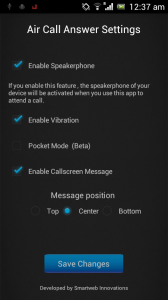
Air Call Answer for Android
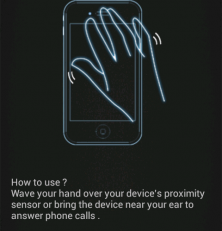
The basic idea behind Air Call Answer can be stated in one sentence, and little else: When someone calls, you simply wave your hand across the screen to answer it. No swiping, no using the side buttons, no nothing—as my grandparents might say. Just give your proximity sensor (that’s the little orb usually near the ear speaker) a brief hello, and then start chatting.
That’s the crux of the scenario, though Air Call Answer does make an effort to expand the whole of it somewhat. For instance, if you’d like for Air Call Answer to put your calls on speaker phone as soon as they’re picked up, there’s a setting for that. You an also enable pocket mode, which essentially protects you from accidentally engaging your phone when you’d really rather not. Beyond that, you’ll get a few more basic tweaks, and not much else. Then again, this isn’t an application designed to completely redesign your entire phone experience. Just one core aspect of it.
Design and Performance
Overall, we have very little to complain about with Air Call Answer. The app is simple to install and setup, and if you’re looking to modify the settings, you’ll not have to jump through hoops to do it. That being said, though we had no such problems ourselves, we’re seeing wide reports of spotty functionality from user reviews. Keeping in mind, though, that the Android platform itself is spread across a wide birth of devices: Some sensors will be better than others, leading to the occasional performance issue.
All of that kept in mind, Air Call Answer still performed admirably on our device, and if you’re looking for just such a tweak, you’ll find what you need here.
Overall Value
And of course, it’s terribly hard to knock any application that is available for free. If you’re scared that Air Call Answer may not work with your hardware, go ahead and snag the free version to play with it. If you like it, you can always upgrade to the paid version (which features no advertisements) at your leisure. All in all, Air Call Answer may not yet be a perfect solution, but if you’re in need, it will get the job done on most devices.
 Android Apps Review Details: Air Call Answer is FREE. This app requires Android 2.2 and up. A small expedite fee was paid to speed up the publication of this review.
You can download it now from Google Play.
Android App Review’s rating:
“The best Android apps are reviewed by AndroidAppsReview.com“