Price: Free
Rating: 

WorldScan-Scan Documents&pdf
Android App Review by AndroidAppsReview.com
When it comes to productivity applications for the Android platform, we’ve had the distinct joy of getting to work with a lot of them. We’ve also happened to use quite a few on our own dime and time, which means we like to think we’ve got a handle on the niche.
With that in mind, today’s review takes us to the land of WorldScan, from WorldScan Inc., a great new application designed to help you scan your critical documents, bit by bit. You can then take these documents and ship them off in PDF form to just about anywhere, keeping them safe and secure wherever they land. For our full review of all its services, you need only to slide on down below the break.
Concept and Functionality
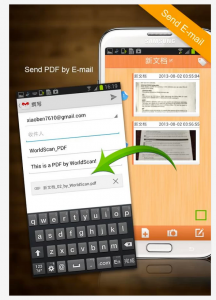
WorldScan for Android
The idea behind WorldScan is hardly new: In fact, we might go so far as to say it was one of the first utilities ever produced for any mobile platform. In essence, it makes it easier to exist with one foot in a paper-trail and the rest in the modern world. Here’s what we mean:
With WorldScan at the helm, all you need to do is point your camera at a document’s page, snap a photo, and then the app will do the rest. It will detect the corners of the page (you can edit these if you need to) and crops the whole down. From there, it autocorrects for contrast and color, making it easier to read. Then, it saves it as the page it is.
That’s it! From there, you can compile multiple pages to be used in a single PDF, which you can ship off in a variety of methods, most notably through eMail. The app also works with just about any document (business cards, memos, bad party invitations, you name it!) so long as its got corners. All in all, that does make it pretty darn useful!
Design and Interface
But, we’re still not quite as floored with WorldScan as we’ve been with other document scanners—and here’s why. The interface is very solid, and we have no complaints there. We found it easy to use and even easier to manage. However, we do wish the app came with a few more features.
For instance, it supports eMail and DropBox, which is a plus. However, we’d like to see further integration with SugarSync, Evernote, or any of the other dozen and two cloud services out there. If this is truly going to be used in a business context, it needs absolute synchronicity.
Overall Value
It’s still hard to find too much fault with WorldScan, though. The application is free in the Google Play Store, which is a tremendous perk. Additionally, it is quite functional, and perhaps easier to use than some of the other, more bloated document scanners we’ve used. All in all, this still makes WorldScan a value and a good recommendation, and with time, it may improve even more.
 WorldScan requires Android 2.2+ and up. A small expedite fee was paid to speed up the publication of this review.
You may download WorldScan-Scan Documents&pdf from Google Play.
“The best Android apps are reviewed by AndroidAppsReview.com”