Price: Free
Rating: 

Start
Android App Review by AndroidAppsReview.com
You know, throughout all the years that we’ve been using Android (I don’t even want to tell you what version number I entered the fold at) we’ve seen a whole lot of start / lock screen modifications for the platform. Some of them have been really cool, some have been really useful, and some have been nothing of the sort.
Today’s offering, though, is an app called Start, from Celltick, and it actually manages to cobble together the best of all worlds. It’s sleek, attractive, and unbelievably functional. It works like a champion, and if you’re tired of your current, boring lock screen, it’s worth a shot! Look below to find our full review.
Concept and Functionality
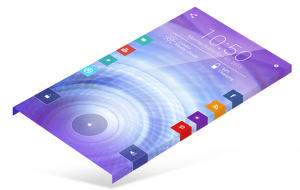
Start for Android
As stated, Start is an Android app designed to modify the lock screen itself. The app gets rid of the stock, vanilla offering entirely, replacing it with a slicker, more modern approach to unlocking your device.
To begin with, after installing Start you’ll notice a lot of new items on the unlock. The usual fly wheel is there for you to drag upward, but there’s also a super-standard slidebar to access your phone as well.
The normal Start install will then add small colored tabs all around that can be swiped to access just about any part of your phone.
Want to access what’s playing? Pull on the red playback tab and then edit your volume, track, or anything else you might need. Need to get to your photos in a hurry? There’s an attractively placed tab for that. Same goes for WiFi, Facebook, brightness, and a host of other things.
In other words, the app puts all that functionality right at your fingertips in an attractive, simple, and swipe-happy way. Best of all, if you don’t like what’s there, just go edit it in the Start settings panel! It’s that easy to swap out the whole set, and more.
Design and Interface
When we think of these kinds of applications, we usually immediately think of the word “clunky.” We’ve had too much experience with badly coded interface mods to think anything else. That being said, Start is actually one smooth operator. It cranked along without a problem, even on our ancient Android phone.
The interface is also stunning, something we don’t get to say often here at Android Apps Review. It’s minimal, it’s colorful, and it’s intelligently laid out.
Overall Value
At the end of the day, it’s hard to knock Start, no matter what direction you approach it from. It’s a solid, elegant, and beautiful way to modify the lock screen to give you a little more power, a little more usefulness, and a little more fun.
With that in mind, if you’ve been waiting for just such an application, then you might want to jump on Start now. It’s still a free title, making it an incredible value. Who knows how much longer that will be the case, so hop to!
 Start requires Android 2.2+ and up. A small expedite fee was paid to speed up the publication of this review.
You may download Start from Google Play.
“The best Android apps are reviewed by AndroidAppsReview.com”