
Price: Free
Rating: 

Baidu Browser
Android App Review by AndroidAppsReview.com

Reviewed by Philip Chan
For non-Chinese users, chances are you have not heard of Baidu. However, it is one of the largest search engines in the world, rivaling Google, in China.
Just as Google has their Chrome browser, now Baidu has its own app browser for Android: The Baidu Browser, from Baidu Inc., available for free through Google Play. Hang with us as we check out this new android app, just released on the Play store market!
Features
The Baidu Browser boasts an array of features, including quick swipe navigation (basically a requirement on most mobile browsers now), night reading mode, quick links, Read Later (offline page viewing, very helpful for times when no data or internet connection is around), and a very small, lightweight browser (it’s just a 3.4 mb download).
It claims to support built-in compression with possible data usage cut by up to 90% (that would be great, if it really work-hard to test!), in addition to a purported 30% faster browsing experience using their unique Tbrowser feature (you’ll be prompted to install this after downloading the app). I found the browser to be fairly quick and reliable when viewing a variety of webpages.
I didn’t have any crash problems or serious errors to report. The app loaded quickly and could fetch webpages at speeds comparable to other app browsers on the market today.
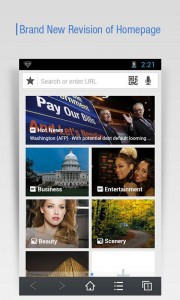
Baidu Browser Android App Review
Appearance and Layout
Baidu did a great job in producing a slick-looking browser. It’s very polished and looks fantastic on my Android tablet.
The interface allows for smooth, quick browsing. Quick Links are smartly placed to help the user get to their popular websites right away. The nightime reading mode is also a great tool to help ease the strain on your eyes and adjust brightness for optimal viewing/battery life as well.
Finally, the offline reading feature directory really helps improve the user experience by making saving for later quick and easy. From a design standpoint, the Baidu Browser is easily comparable with other big-name browsers on the market.
Value
Overall, it is slick, fairly fast, and it’s free! There are a lot of Android browsers available on the market today, such as Dolphin, Chrome, Firefox, etc.
It’s nice to see Baidu also stepping into the mobile browsing market as well. I don’t have any major critiques for this app; it seems to get the job done and offers a nice array of viewing options, multitabs, voice search, QR scan and more for users.
If you are looking for an interesting new browser, check out the Baidu Browser on Android. You’ll no doubt find it a worthwhile addition to your mobile browsing.
 Baidu Browser requires 2.2 and up. A small expedite fee was paid to speed up the publication of this review.
AndroidAppsReview Rating:
“The best Android apps are reviewed by AndroidAppsReview.com”







