
Price: $2.99 (Free also available)
Rating: 
DU Battery Saver PRO & Widgets
Android App Review by AndroidAppsReview.com
Reviewed by Arshdeep Singh
Though our phones have become smartphones, are they really smart? Do you remember the good old days when phones had a ridiculously long battery life? They could even let you to talk with your loved ones for days without interpretation.
Well, sorry to say but those days are long gone and these days phones hardly last a day.
Most people carry either an extra battery or an external portable charger. But of course, not everyone does that and even if you try, sometimes you get caught without it.
Thankfully utilities have come along to help those without a charger or extra battery. These utilities optimize your device’s battery only by software dedicated entirely to that function.
DU battery Saver PRO, from DU Apps Studio, is one of those utilities but as you’ll see, it really stands out from the crowd with its great ease of use and very powerful functionality.
Features:
First let’s talk about the main feature of this app which makes it different than others. Support for more than 17 languages which makes it more local. Guaranteed 50 per cent increase in battery life, no other app does this. It offers a bunch of predefined power management pre-sets so that you can change the settings on the go plus there is an option to create a custom profiles too.
One click optimization is another great feature and we really like that there is an option to perform this step instantly with the help of widget button.
DU Battery Saver PRO Android App Review
The charging manager is another feature by which you can decrease the time it takes for your device to charge. The time scheduler allows you to limit the usability of background apps and settings at predefined time interval based on your routine.
The free version of the app includes all of the features listed above, but for those who don’t have any problem in rooting your device then the CPU Frequency option (available only in the paid version) is for you, it allows you to reduce the clocking speed of the processor or the number of working of cores when the screen is locked.
Design and Navigation:
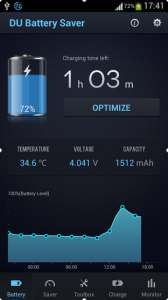
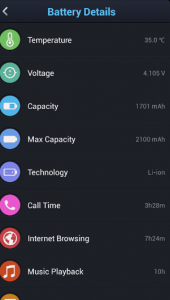
It features a two toned color scheme, a blue-black combination that makes the app look pleasant and cool. At the bottom of the app you will find five tabs for easier and simple navigation. The first battery tab displays the juice left along with the estimated time, voltage, temperature and capacity. Above that there is an option to optimize the usability in one click. In saver mode you see two sub tabs; Mode and Smart where you can create your own custom tweaks or even use the one already present in the application.
Value:
I played with the PRO version for this review but it is also offered for free in the Play Store. Plus, it’s merely 4MB in size then it has been downloaded by more than 40,000,000 users which is really huge for an app like this. I think the number is pretty impressive and should be enough to recommend it to you. Personally when I used this application I felt that there is little bump is battery life of my Nexus 5 and this result should improve over time.
With the paid PRO version you get the option to tweak with CPU frequency and use the Auto Clear feature which automatically shuts down processes that could lower the battery life. Finally you get an intelligent mode switching option in the PRO version. This app seems to really help and the developer claims that the paid features allow you to increase battery life by 70%. Personally I have not been able to test that, but you be the judge, try it.
Score:
I give this app 5 star based on its performance, usability and simplicity, and, as already mentioned, it is also available for free.

DU Battery Saver PRO requires Android 2.1 and up. A small expedite fee was paid to speed up the publication of this review.
AndroidAppsReview Rating:
Find your next Android app at AndroidAppsReview.com
What do YOU think? We would love to hear what you have to say. Try it and leave a comment.







Battery Saver HD - Battery saver, energy optimization and task killer to save battery.
https://play.google.com/store/apps/details?id=com.bat.saver