
Website Builder for Android
Price: Free
Rating: 

Android App Review by AndroidAppsReview.com

Besides our work writing Android app reviews we have a day job creating and managing websites. Do we do it for the money?
Maybe, but the truth is we love doing web development, which means we feel we have a particularly strong grasp on the requirements to get the job done quickly and right.
While this was traditionally the realm of laptops, you can now develop serious web sites using just your phone. Using your phone offers great convenience, of course, but it also puts a special burden on the app to be very well designed.
Today’s entry is one that is well worth a look-see.
It’s called Website Builder for Android, from Simple Different Co Ltd, and if you’ve been looking for an easy way to fashion together a site using nothing but your favorite armchair companion, this app may be a good fit for you.
Concept and Functionality
If you’ve never used a phone-based web developer it’s about time you jumped in. Spoiler alert - the water’s fine 🙂 Of course the key to success is getting the job done without sacrificing the end result.
Without spending a dime you can set up a fully functional website that includes a variety of blocks that can be easily added to your pages for general content, blogs, and even E-commerce using PayPal.
It’s an idealistic kind of thought, but thanks to apps like Website Builder for Android, you get a set of tools to get the job done. You can add new pages, create custom text areas, edit colors and fonts, add photos from any source, and even change the whole site scheme.
There are three levels: Starter (free), Smart and Pro, with the Pro version offering the most capability and expansion possibilities.
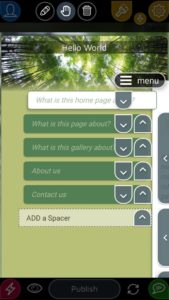
Website Builder for Android also happens to include a few items that we didn’t expect. For instance, there’s PayPal integration for e-commerce (Pro), Google Analytics tracking (Smart & Pro), which is a big deal to any serious website owner, and access to free images via Unsplash (all).
For those looking to reach an international audience the Pro version also lets you duplicate your site into another language, and there are 35 that are supported.
All in all, it’s a solid experience—but we’re not finished here.
Design and Interface
When it comes to website creation, web design is crucial. You want the site to quickly communicate what it is you do, what your purpose is, what you’re selling (if you are) and other key facts about you and your site.
Website Builder for Android provides quite a bit of guidance to make sure you cover all your bases and a very nice variety of website pieces for you to use. Although to keep it easy-to-use there are some trade offs in design options.
For example, you can choose between a variety of color schemes, image layouts and fonts which lets you build a very nice customized site but you don’t get rollover appearance of panels and other slick effects that you might get using a full blown dev environment.
Then again the slick effects you sometimes see on high-end sites usually don’t work very well when accessed from a phone anyway.
Overall Value
Overall, Website Builder for Android is an extremely well designed app that delivers on the key areas that matter most: ease-of-use, flexibility, capability and extensibility.
The developers are smart to let you can snag it for free with a subdomain URL. It’s a great way to check it out and see what the app has to offer.
 Website Builder for Android requires Android 4.1+
AndroidAppsReview Rating:
Find your next Android app at AndroidAppsReview.com
What do YOU think? We’d love to hear your comments, try it and let us know!