


Written Android App Review
I have to admit, I was skeptical when I saw the recent release of Pumpkins vs. Monsters Android app. My initial thought was that this game is being released at the wrong time. This would be a better game to release around Halloween – not in the spring. But let me tell you, I’m glad they did because this is one game that gets addicting quick!
Pumpkins vs. Monsters
Gameplay:
After I embarked upon the Android apps review, I realized that it took me a bit to figure out just how to play this Android game. At first I tried the ‘Endless’ mode instead of ‘Story’ mode, thinking it would be easier to just play without worrying about a story line. However, as it turns out, story mode is set up much like Angry Birds – in levels marked by small boxes on the screen. I couldn’t figure out how to kill the monsters at first and ultimately went back to the Android Market to see if there was mention of how to play. The instructions, “Simple control, flick the pumpkin, attack monster!” didn’t make any sense to me. I had tried flicking… on the monsters. Oops. That was my mistake. I managed to line up a group of pumpkins (there have to be at least three to a group) and flicked on the pumpkins this time. Success! The pumpkins hurled themselves at the monsters and they all went *POOF!*, leaving a trail of coins and pumpkins behind. After the last monster game I tried (Bomb Toss) I quickly figured out I needed to tap the coins to pick them up. Alright, now we were getting somewhere!
I finally beat the first round of monsters and moved on to the second round. A screen popped up asking if I wanted to upgrade or purchase some items with the coins I earned. I chose to upgrade the first (and cheapest) item available but I wasn’t sure what this was or what it did. I beat the second round then got the same upgrade screen again. During the third round I scoured the screen for these items and found them in the upper left hand corner. I touched them but nothing happened. Then I tried sliding them. Success again! I dropped a bomb on top of a monster and it exploded. The light bulb had switched on.
From there on out I was unstoppable. Those monsters didn’t stand a chance. I figured out how to repair my wall, set traps, and blow up monsters munching at my wall while my pumpkins were repopping and how to take down the big guys.
For overall gameplay I would give this Android app five stars. However, the lack of instructions made starting out quite difficult and for that, it loses one full star. The game is incredibly addicting though and I had to force myself to stop playing so I could get some work done!
Design:
Pumpkins vs. Monsters
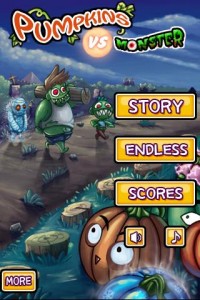
Pumpkins vs. Monsters Android app has the type of game design you would expect from a title like this. The setting appears to be a dark marsh or swamp and the wall is made out of tree stumps. Monsters march from the top of the screen down towards the bottom, where a pumpkin patch is ready to wreak havoc. Some of the monsters look like zombies, others look like monster iguanas and others look like ogres. The pumpkins (green and orange) look normal until three or more are placed together. They then light up and get a “I mean business” look on their faces. Once hurled at the enemy, they explode into a dozen pieces. For a game like this, the graphics are actually quite decent and the format is well thought out. It even includes a pause button on the screen should you need to stop the monsters for a moment. I award five stars for design.
Value:
Not only is this game addicting, but it is free as well! There are ads, as is typical of most free games, but they are thin banner ads and are relatively non-intrusive. They certainly don’t hurt gameplay any. For the fun and enjoyment this game provides, I award five stars.
Android Apps Review Details: Pumpkin vs. Monster Android app is free. This app requires Android 2.1 and up. You may download Pumpkin vs. Monster from the Android Market.
This Android app review, as well as the other Android app reviews for droid phones and droid tablets on this site, are brought to you by AndroidAppsReview.com.








Thank you for posting this, I was really having trouble figuring out how to play-didn’t get the coin thing at all, which was quite a handicap! Now that I understand, I couldn’t stop playing until my battery needed re-charging.
Glad I could help! It threw me for a loop at first too, but once I figured it out I had a blast!