Code&Robots
Price: Free
Rating: 

Android App Review byAndroidAppsReview.com
Over the years, we’ve had the distinct joy of getting to sample a wide variety of new technologies that are great to use in a STEM class.
Some we’ve really, really liked (a la Elegoo’s Arduino Uno-based Smart Robot Car Kit ) and some we have just not had an interest in (sleep trackers, pedometers tied to iPhones and too-simple robots).
That being said, we absolutely love being able to build (via 3D printing) or buy (via a nicely designed kit) a relatively sophisticated robot on the cheap that has a little more pizazz.
The finishing touch of all this is this app from Chico Charlesworth.
The Code&Robots app is a rather incredible tool for STEM classes and lets you easily control, play with, and customize the behaviors of your Otto.
We’re also quite fond of the Arduino platform (much less expensive than Raspberry Pi these days), which thanks to the genius that is Otto DIY Consortium, and specifically the open source Otto robot developed by Camila Parra Palacio.
Because it’s open sourse the possibilities of building one just the way you want are endless. Of course you can go to Thingiverse.com and download the .stl files you need to 3D print it but you’ll quickly see that the variations and customizations done by many folks are quite inspiring.
Once you have a completed Otto up and running the fun is just beginning. If you have access to a 3D printer just hop over to Printables and check out how easy it is to expand your basic Otto using the additional parts from Otto Humanoid Robot.
But don’t forget about programming Otto. That’s made super easy with OttoBlockly that you can download from GitHub here. That will get you started and with just a couple of clicks you can connect to your Otto via Bluetooth. That’s where this app comes in and the fun really starts.
Concept and Functionality
For those not in the know, we should likely explain first what it is that Otto is and does. More or less, the basic Otto robot is an open source build that utilizes an Arduino MPU (microcontroller unit), 4 servo motors, an ultrasonic sensor, piezo buzzer and batteries.
The MCU comes preinstalled with a bootloader that lets you upload and run programs in the Arduino programming language (a program in that language is called a ‘sketch’) and can be easily programmed with the visual block-style OttoBlockly application.
By adding a Bluetooth module (HC-06 or similar) you can connect to Code&Robots which then enables you to control Otto via a well designed app.
The ingenious design of Code&Robots breaks out the functionality into segments that appeal to users of different skill and experience levels.
Design, Interface and Implementation 
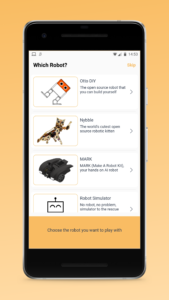
To begin with, this app lets you control other open source robots, Nybble an open source robot kitten from Petoi and MARK (Make A Robot Kit). As with Otto, you can 3D print the body parts and use parts purchased separately or you can buy the complete kit.
You actually don’t need this app to upload and run sketches on Otto, it just makes the experience much more interactive and enjoyable. Given that this is primarily targeted at STEM education programs, and younger robotic engineers in general, that’s a very good thing.
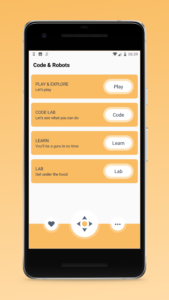
Upon opening the app you first select which robot you want to control and then you get to a screen with lots canned behavior options. In the Play & Explore you can get Otto to do specific ‘skills’, sounds, or moods and at one of three different speeds; slow, normal or fast.
In Code Lab you can select behaviors for Otto to do and set the duration of each behavior. You can also link behaviors to create more complex sequences.fd
Unfortuantely there doesn’t seem to be any content in the Learn section and we weren’t able to get the Robot Simulator working. It seems the server may have been online when we tried, but that doesn’t diminish the value of the app for Otto and his fellow bots.
Overall Value
We’re actually very enthusiastic about this app and hope to see it advance as time goes on. We see it as more of a starting point for getting kids, and adults, quickly using Otto (or Nybble or MARK) and getting some important instant gratification.
Not everyone wants to build robots but apps like Code&Robots makes them accessible to a wide audience that would otherwise find the challenge too intimidating.
 Code&Robots requires Android, version varies by device.
AndroidAppsReview’s rating:
Find your next Android app at AndroidAppsReview.com
What do YOU think? We’d love to hear your comments, try it and let us know!