
Discord - Friends, Communities, & Gaming
Price: Free
Rating: 
Android App Review by AndroidAppsReview.com
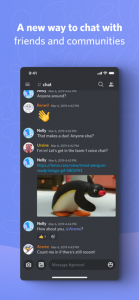
There is something to be said for mass appeal when it comes to social networking apps. While it’s difficult to achieve, it’s the only thing most people want when thinking about using one.
With this in mind we’d like to bring to your attention one of the rare birds that’s been able to reach the lofty, and incredibly difficult, success of having a huge global audience.
Discord is an innovative app that helps users share networking details with a few taps of their finger. Discord is built on the concept of simplicity, and it has definitely paid off.
Concept and Functionality:
While we have featured quite a few social media apps here on AndroidAppsReview.com, we haven’t seen one this popular with gamers outside of hardcore gaming platforms such as Twitch.
This app, of course, also functions as a more general network for all kinds of groups, allowing you to easily find fellow Discord users and share with them.
No matter how you prefer to connect, Discord has you covered. Share videos, coordinate meetups, or just talk about your day by open a voice channel, which is like your own private radio station.
Discord, from Discord, Inc., definitely gets extra credit for being so versatile.
Features:
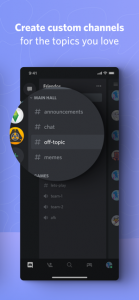
The registration process of Discord easily starts it off in the right direction. Quick, easy, and all you need is an email address.
With all the bs happening with Facebook privacy and unregulated access to users’ data (supposedly fixed but who knows?), it refreshing that you don’t need a Facebook account to sign up.
The first thing you do after registering is to “Create Your Server” by selecting an existing template such Gaming or Study Group or you can not use a template and Create My Own.
According to the app, “Your server is where your group hangs out. Make one to start chatting with your friends for free”.
In fact there’s nothing about this that is confusing or difficult. You simply invite those who you want to connect with by using the link provided and start sharing text, voice and video among the group. People can then be assigned to roles and groups so your level of control as to how people are notified can be highly selective.
Another incredibly useful aspect to this social platform is the way the moderator can manage the pace of the interactions. You can adjust the interaction speed of comments from very slow (“Slowmode Cooldown”) to no limit (“Slowmode is off”). We’ve never seen that anywhere else.
A great example of a group using Discord to reach out and stay connected in the Critical Med group. You can join their group by going to this invitation: https://discord.com/invite/zad9gj3
Value:
Discord is available to download for free from Google Play. There are some in-app purchases for more “professional” use but casual use is free.
Whether you want to share a few details with friends, or you have an account with every social networking service, Discord is something you definitely have to try.
 Discord requires Android 5.0 or later.
AndroidAppsReview’s rating:
Find your next Android app at AndroidAppsReview.com
What do YOU think? We’d love to hear your comments, try it and let us know!








I love how you bring these insights to us, love the site!
Great post! We are linking to this great post on our website. Keep up the good writing.
Nice post. I learn something totally new about Discord even though I’ve been using it.
Hey there. I just noticed this amazing site and I honestly love it. Thanks for covering Discord, I love this app.
you nailed it, i’m a gamer and I love it