Radio Player, MP3-Recorder by Audials
Price: Free
Rating: 
Android App Review by AndroidAppsReview.com
It’s no secret that just about everyone with a smartphone (which is just about everyone) will use it to play music at some point and, more likely, most of the time. Sure you can opt for the same old streaming app or Android Music, but is there something better?
Audials is the app to get for those who love music and podcasts and are tired of flipping through radio stations to get the songs they like. It gives the power to its users to choose what they want to listen to and record songs from radio stations across the globe!
Developed by Audials AG, Audials is without a doubt one of the best radio podcast and song recording apps for Android devices. In addition you’re non-Android buds can enjoy it too since it’s also available for Windows and iOs.
Features
Audials provides users with an easy way to listen to their favorite radio stations and podcasts by having a swiftly searchable database that includes over 260,000 podcasts and over 100,000 radio stations. You can quickly search for a song, a station or podcast, a genre, an artist, or a specific country, region, or city and find what you’re looking for.
On starting up the app for the first time, users will need to wait a few moments for the app to finish Indexing music. After that initial startup, the app seems to run flawlessly (although we noticed that some users might notice system lag if their phone has thousands of songs downloaded onto it, as Audials can also play music found on the device).
After navigating to a station or podcast to listen to, just tap the Record text to go to the recording screen. From there, simply tap the Record button and Audials will (depending on settings) begin to record immediately or after the current song in either Continuous or Cut Track mode.
When music is playing through the Audials app, users can access the Equalizer settings and adjust the sound and amplification of their music.
Apart from being able to record and save music and podcasts, Audials also includes a Clock Radio function that lets the app be used like an Alarm Clock. Plus Audials can stream music to Airplay receivers, supports Chromecast, and even supports Android Auto for when you want to rock out in your vehicle!
We found Audials to be an ideal app for music listeners and were thoroughly impressed with its multitude of features.
Appearance and Layout
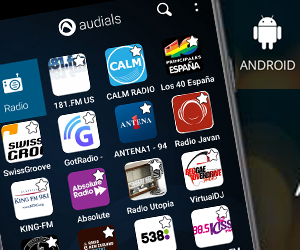
Audials looks great and has the option of either a Dark or a White colour scheme with either the station or cover art being shown. Browsing through songs, stations, podcasts, etc. is just a simple swipe and scroll with an easy-to-see “More” button that loads the rest of the list and the icons are easily discernible.
The layout of Audials is well-thought out and straightforward. The Search, Home, and Menu icons are all easy to see and access from anywhere within the app, and the various buttons throughout the app are easy to tap.
We thoroughly enjoyed the cool design of the interface in Audials and found it to be smooth and delightful to use.
Value
Audials is free to download and its ability to save songs onto your device makes it great for music lovers of all types! Plus, the developers are constantly working to help make the app better, as evidenced by their App Tester Group. With occasional updates, a solid userbase, and an ad-free (except for the various ads that radio stations play) experience, Audials is well worth the download.
Overall, we found Audials to be a wonderful app that is easy to use, splendid to look at, and a great way to always have music to listen to.
Audials requirements vary with Android devices.
AndroidAppsReview’s rating:
Find your next Android app at AndroidAppsReview.com
What do YOU think? We’d love to hear your comments, try it and let us know!