


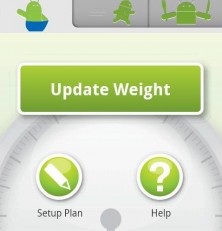
The latest feature-rich weight loss Android app has hit the market. Noom Weight Loss for Android is all that and a bag of low fat pretzels.
Functionality
State your journey with the Noom Weight Loss Android app by setting a weight loss goal. Do you have 5 lbs to lose? Ten? Choose a target date, but keep it real. Noom Weight Loss will tell it like it is. Unrealistic goals (such as losing 10 lbs in three weeks) will be deemed “very ambitious” with a “high risk of failure.” Set healthy, realistic goals to make your Noom Weight Loss app happy again. Enter your starting weight and move on. Schedule work outs through the Noom calendar and receive helpful reminders to keep you on track.
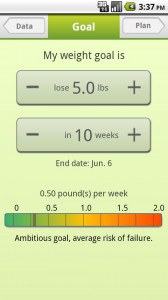
Noom Weight Loss
There are a few surprises in the workout categories. Yoga, Pilates, jump rope and squash? They’re all there. Some of the other categories barely make sense. Why is “driving” a work out category? Beats me. Schedule your workout types and lengths for each day of the week. Noom Weight Loss will estimate your weekly loss based on workout plans and suggest a complimentary calorie reduction to help make your goals a reality.
Press the work out icon and let Noom Weight Loss track you through your work out. Select your activity from the drop down menu. Noom Weight Loss will automatically provide a polite countdown to begin your work out, auto play music from your phone, and track your progress through your Android’s GPS function on a fun little map.
Additional features such as a task bar calorie goal medals and cute fruit character rewards for your progress make this app a lot of fun. Compare your stats with world record holders. Enter meal info for calorie and nutrition suggestions. Share your results with friends on Facebook and Twitter.
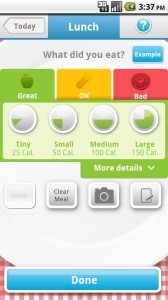
Noom Weight Loss
To be honest, there are half a dozen other features buried in this Android app. Having a lot of features is usually a good thing, but after reading through countless menus I got a little weary of exploring. Half of the buttons try to lead you to other apps. The Noom Weight Loss app for Android loses one golden star for feature overkill.
Layout and Design
I already voiced my concern about the Noom Weight Loss app being overly complicated. Unfortunately that issue resurfaces in the app’s layout and design. Set up takes several pages when one or two would suffice. None of the tabs are cross-functional. Settings are scattered throughout the program at random. The layout seems poorly thought out and discourages use. I could see using the Noom Weight Loss Android app to do GPS tracks my workouts, but there are a lot of friendlier apps that do that just as well.
Value
This app is free! Free is good. It’s not the best weight loss app out there. If you are already using a weight loss app and are looking for something a bit more feature-rich, give it a try.
Android Apps Review Details: Noom Weight Loss Android app is free. This app requires Android 1.5 and up. You may download Noom Weight Loss from the Android Market.



Most likely the reason you had trouble with this app is because it’s not truly meant to be a standalone app. It’s actually a part of the main Cardio Trainer app which utilizes a number of other plugins - this being one of them. I have used Cardio trainer for about a year to log my bike riding and was waiting for this part of the program to be released. Some of their plugins are paid apps but most are free. Anyone who is an exercise enthusiast or needs a comprehensive program to guide them with weight loss and exercise will love Cardio Trainer and its plugins. It is, however, a little annoying with its scattered settings, as you stated, but again, this is because of the fact they are plugins.